.svg)

Updated 17 October 2026. Creating an AI agent in 2026 no longer requires coding skills: this guide walks through the seven steps, from choosing the use case to deployment, with Copilot, Claude, ChatGPT, n8n or code, plus lessons from our Agentathons.
In 2026, everyone wants their own AI agent. Few people know where to start. 😅
Copilot, Claude and ChatGPT have all overhauled the way they build agents this year, and the menus keep changing.
The method, however, stays the same from one tool to the next. At Meilleurtaux, 93 employees who had never written code built 14 agents in half a day. At Daher, 130 managers created their own AI agent during an Agentathon.
Here is how to create an AI agent, step by step, with the tool you already have 👇
“Autopilot is a persistent, proactive and personal agent that keeps working even when you are not”, writes Jared Spataro, Microsoft’s Chief Marketing Officer for AI at Work.
In brief
- An AI agent is an assistant that acts. It follows instructions written once, draws on your documents and carries out a task, whereas a chatbot only answers.
- You do not need to code to create an AI agent. Agent Builder in Copilot, Skills and Cowork in Claude, workspace agents in ChatGPT: everything is described in plain language.
- The right tool is the one your company already uses: Copilot on Microsoft 365, Claude or ChatGPT if your teams have a licence, n8n or Make to chain applications.
- Seven steps: define the use case, choose the tool, write the instructions, connect the data, test, deploy, govern (governance and GDPR).
- A prototype takes two hours, a business agent connected to your tools a few days.
- The custom agent comes later, once the prototype has proved its worth and needs to be connected to your systems: that is what our AI agent creation offer is for.
Further reading
More of our articles on AI agents:
What is an AI agent? The four components
An AI agent is a program that combines a language model with the ability to act. A chatbot answers a question. An agent receives a goal, draws up a plan, uses tools and hands you finished work.
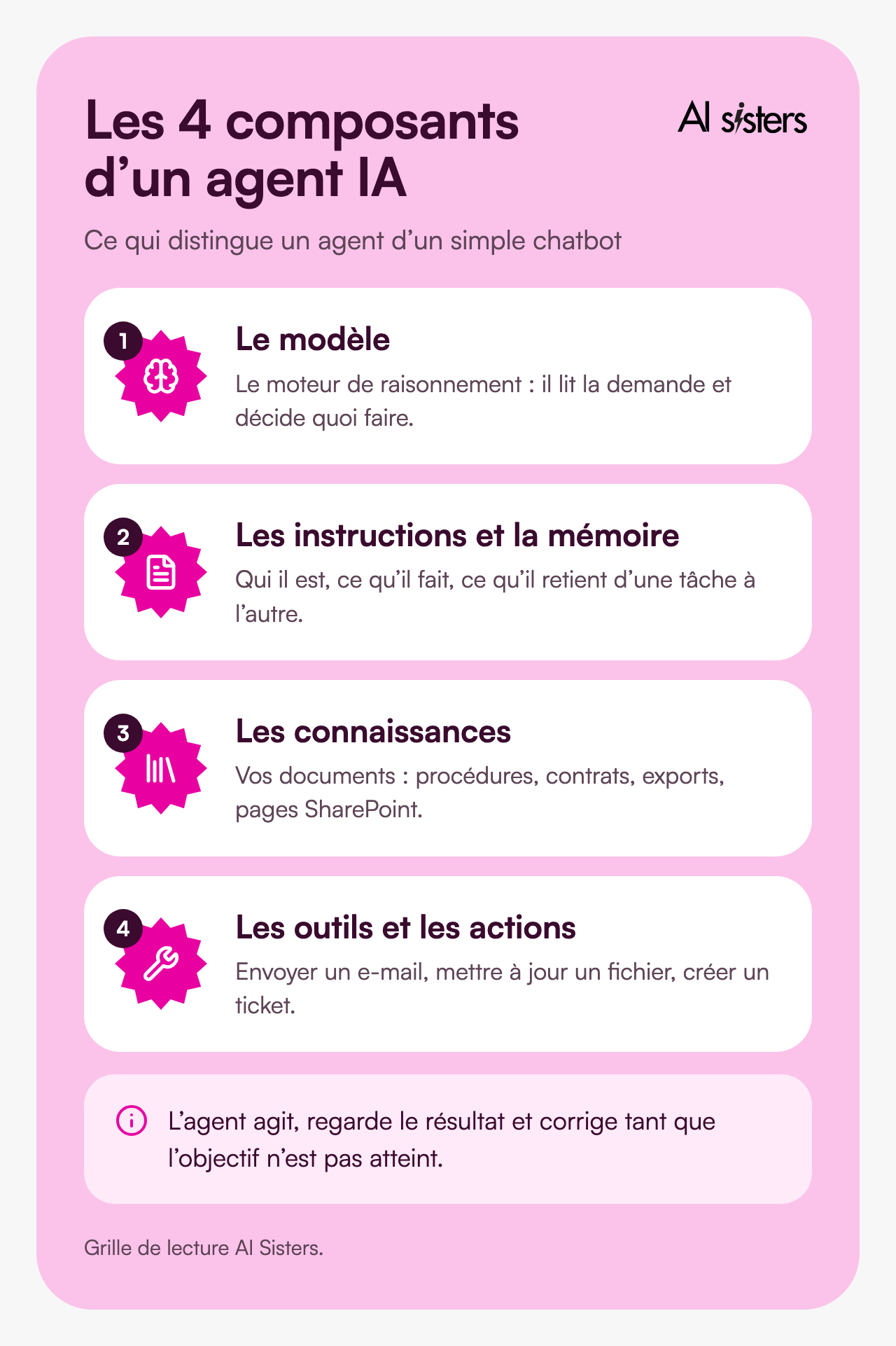
The model is the reasoning engine: GPT, Claude, Gemini or an open-source model such as Mistral. It reads the request and decides what to do.
Instructions and memory tell the agent who it is, what it must do and what it should remember from one task to the next.
Knowledge means your documents: procedures, contracts, Excel exports, SharePoint pages. The agent looks up information there before answering. Specialists call this RAG.
Tools and actions let it act: send an email, update a file, create a ticket.
The agent works in a loop: it acts, checks the result and corrects itself until the goal is reached.
💡 To put it simply: a chatbot is a colleague you ask a question. An agent is a colleague you hand a file to, along with a procedure sheet. It knows where the documents are, what it is allowed to do, and when it should come back to you.
How to create an AI agent: the seven-step method
This is the method we use in our Agentathons, and it works in Copilot, Claude, ChatGPT or a no-code tool. The first four steps build the agent; the next three make it reliable and usable by a whole team.

Step 1: define the use case
Choose a task that comes up every week. A good candidate has stable inputs, a deliverable in a known format and a duration you can measure. If you have typed the same instructions three times, it is an agent.
Describe it with the DTR method.
- Data: which sources you give it.
- Task: exactly what you ask it to do (summarise, compare, extract, draft).
- Result: what the deliverable should look like, and who it is for.
Also note how long the task takes today. Without this baseline, you cannot tell whether the agent saves time.
Step 2: choose the tool to create your AI agent
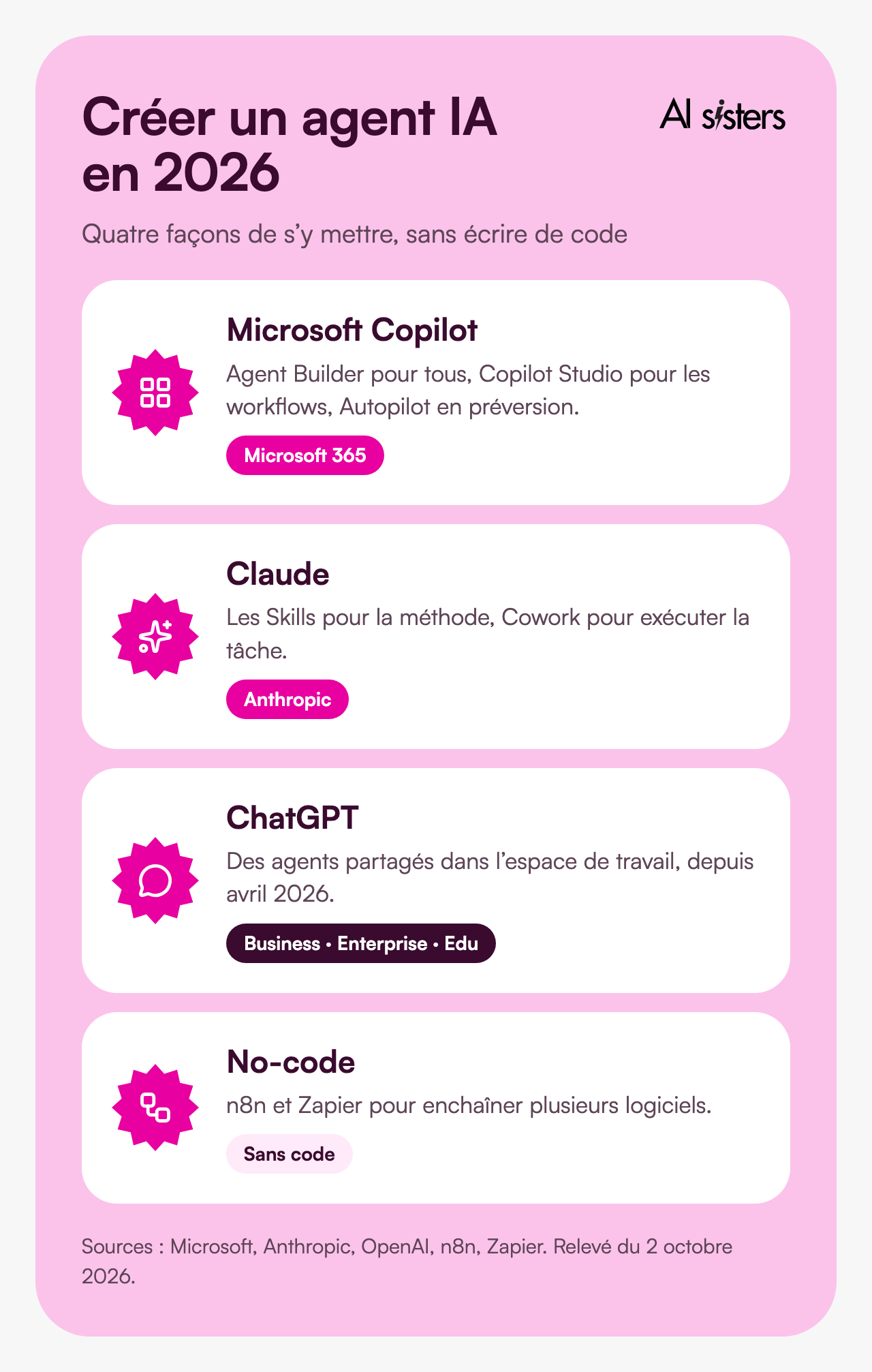
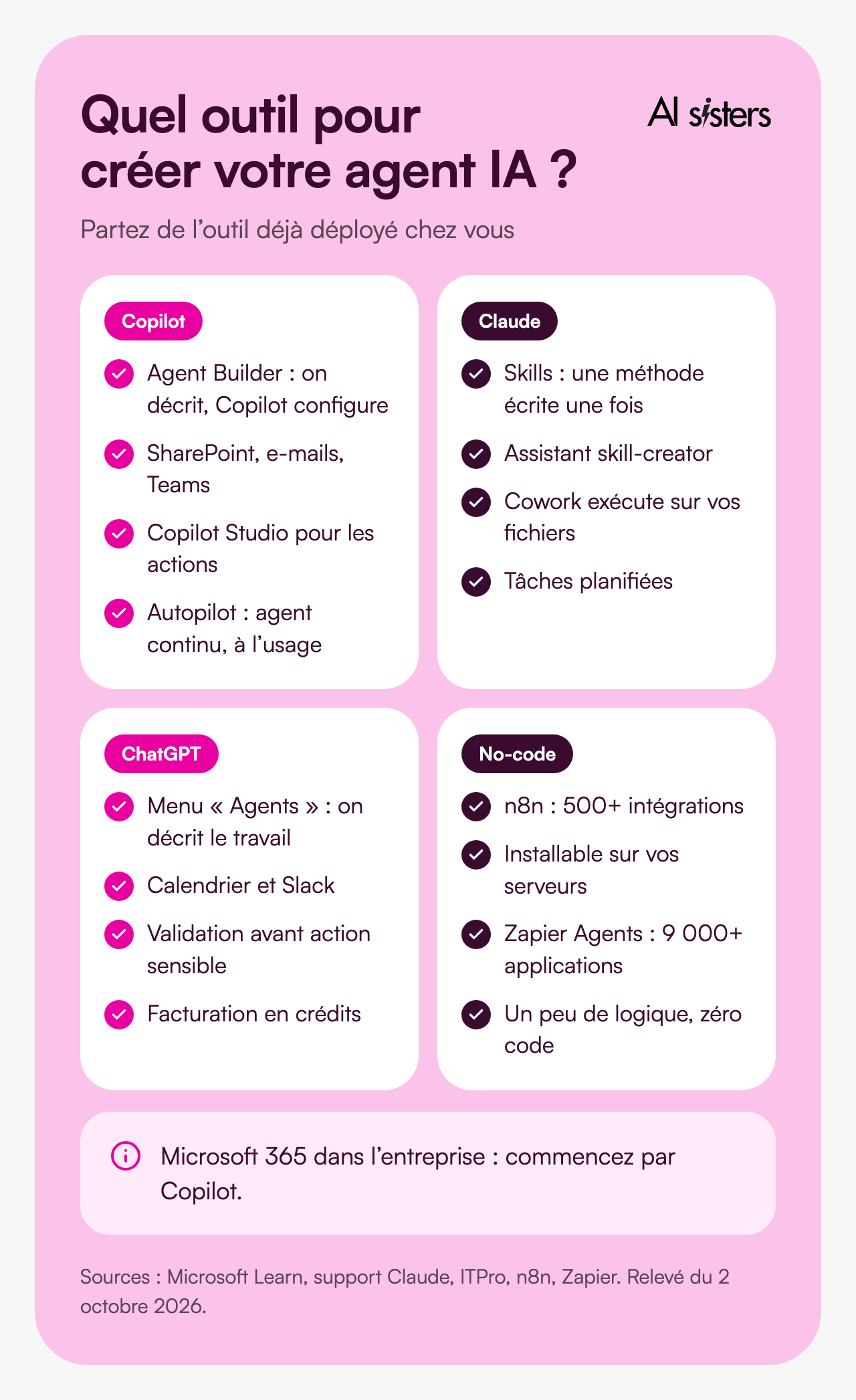
Each of the major assistants has its own agent builder. The right choice depends mainly on the tool already deployed in your company, then on how deeply the agent needs to integrate.
Microsoft Copilot: Agent Builder, Copilot Studio and Autopilot
In Microsoft 365 Copilot, the “New agent” button opens Agent Builder. You describe the agent in plain language, Copilot fills in the name, description and instructions (up to 8,000 characters), and you test it in a built-in test pane. You can add websites, SharePoint files, your emails or your Teams conversations. Actions in other applications and more advanced agents go through Copilot Studio. Since 25 September, Autopilot goes further: an agent that works continuously in the cloud, with its own identity in the company directory. It is still in private preview and billed on a usage basis in Copilot credits. We covered these changes in our article on the new Copilot.
Claude: Projects, Skills and Cowork
A Claude project brings together instructions and reference documents that Claude uses in every conversation: it is the simplest form of specialised assistant. A Skill goes further: it is a method written once (the format of a report, the tone of a customer reply) that Claude applies whenever the situation arises. In the Skills section of the settings, the skill-creator assistant interviews you and writes the file for you. Cowork then carries out the task end to end, on your files and authorised tools, including at set times thanks to scheduled tasks. Our guide to Claude Skills and our article on what is new in Cowork cover both.
ChatGPT: from GPTs to workspace agents
Custom GPTs were long the entry point: instructions, a few files and a shareable assistant. In April 2026, OpenAI launched shared agents for its Business, Enterprise and Edu plans. You click “Agents” in the sidebar and describe the work: ChatGPT defines the steps, connects the tools and tests the agent. These agents can run on a schedule, work in Slack and ask for approval before a sensitive action. They succeed custom GPTs, which OpenAI plans to convert. They have been billed in credits since 6 May 2026.
No-code tools: n8n, Make and Zapier
They are useful when the agent needs to chain several applications: read an email, query the CRM, update a spreadsheet, notify the team. n8n claims more than 500 integrations and can be installed on your own servers. Zapier Agents connects to more than 9,000 apps. Make works on the same principle of visual scenarios, into which you insert an AI model at the right step.
Code: for a custom agent
When the agent needs to integrate closely with your information system, follow complex business rules or run on your own infrastructure, you move to code, using the agent development kits from model providers or open-source frameworks. This is the territory of custom AI agent creation in 3 days, carried out with a technical team.
If you are still torn between assistants, our Claude, ChatGPT or Gemini comparison will help you decide.
Creating a free AI agent: what is possible
You can create an AI agent without paying, with reduced features.
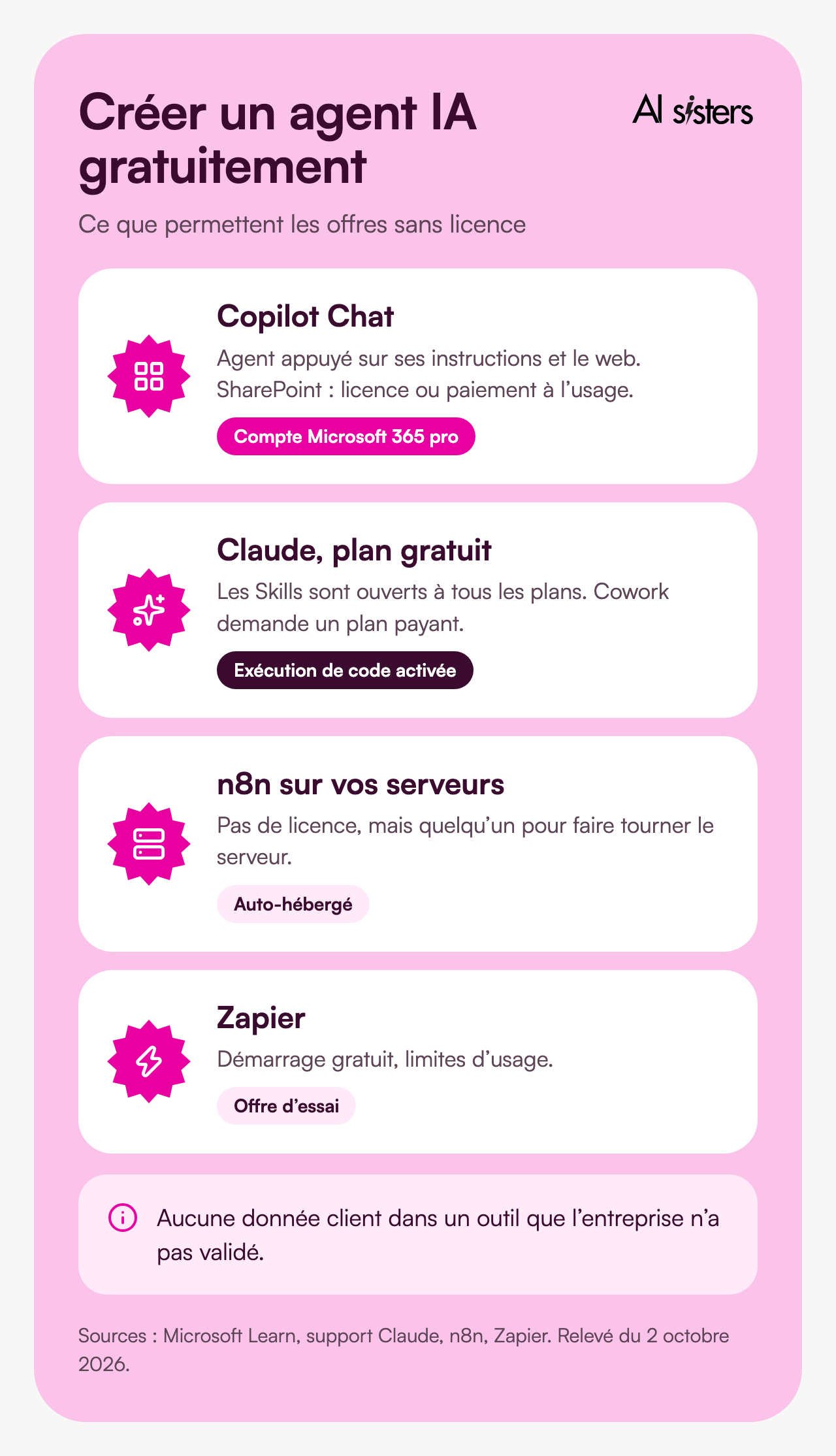
With Copilot Chat, included in a Microsoft 365 business account, you can, if your administrator allows it, create an agent that relies on its instructions and the web. For it to read your SharePoint files, you need a Microsoft 365 Copilot licence or pay-as-you-go billing enabled by your administrator.
With Claude, Skills are available on all plans, including the free plan, provided code execution is enabled. Cowork requires a paid plan.
With n8n, the self-hosted version has no licence fee, but someone has to run it. Zapier lets you start for free.
Free plans are for testing an idea. To deploy, you will need a licence, and no customer data should go through a tool your company has not approved.
Explore our AI training courses & book a call
Browse our training modules and choose, with us, the one that best fits your AI needs.
📚 See our AI training 📞 Book a discovery call
Step 3: write the instructions
Role, context, task, goal, constraints, format, tone. Here is a template to paste into the Instructions field:
“You are the assistant for the [department] team at [company].
Your mission: using [documents provided], produce [deliverable] for [recipient].
Steps: 1. read [source]; 2. identify [items to extract]; 3. write [format, length].
Rules: do not recalculate any figures; if information is missing, say so instead of making it up; cite the source document for every statement.
Tone: [professional, direct]. Format: [table, email, one-page note].”
Write the guardrails into the instructions themselves: what the agent must never do, and when it must stop and ask you for approval.
Step 4: connect the data and tools
Add the knowledge. Upload the business documents the agent needs, and only those: one up-to-date procedure is better than ten contradictory versions. Ask three questions you know the answer to and check that the agent cites the right document without inventing anything.
Connect the tools. Outlook, Teams, SharePoint, Slack, your CRM: each connection gives the agent the power to act. Give it the minimum rights, read-only until more is needed.
Use a standard where you can. The MCP protocol connects an agent to your tools (CRM, databases, files) without bespoke development each time. In December 2025, Anthropic handed it over to the Agentic AI Foundation, co-founded with OpenAI and Block under the Linux Foundation, with the support of Google, Microsoft and AWS.
Step 5: test and set guardrails
Compare version 1 and version 2 on the same questions. Try edge cases: a missing document, a vague request, an off-topic question. Have two or three future users test the agent, not just the person who built it.
Then ask yourself: what happens if it gets it wrong? If the error can be caught, automate. If it has a financial or legal impact, keep a human in the loop.
Step 6: deploy and measure
Share the agent with a pilot team, along with a short usage note: what it can do, what it does not do, and who to report problems to. Record the time saved per task against the baseline from step 1, then widen access once the results hold up.
Plan for maintenance too: an agent whose documents are out of date will be confidently wrong. Appoint an owner who keeps its knowledge and instructions up to date. More free templates and guides are on our resources page.
Step 7: governance, security and GDPR
An agent that reads your documents and acts in your tools should be supervised like a new member of staff.
- Personal data: give the agent only the data its task requires, and use a tool approved by your company, covered by a GDPR-compliant data processing agreement.
- Hosting: check where data is processed and stored, and how long it is kept.
- Access rights: the agent should not see more than the user working with it.
- Traceability: keep a record of what the agent read, produced and sent.
- Security: protect yourself against prompt injection, instructions hidden in a document to hijack the agent.
- AI Act: people who use the agent must be trained, and people who interact with it must know they are dealing with an AI.
For decisions that directly affect a person (recruitment, credit, disciplinary action), human approval remains the rule.
How much does an AI agent cost, and how long does it take?
Timelines. A first prototype takes two hours: that is what teams do in our Agentathons. A business agent connected to your tools and tested by your teams takes a few days. The longest part of the work is often upstream: formalising the know-how the agent will apply.
Costs. They fall into three items:
- Licences: Microsoft 365 Copilot, a paid Claude plan or a ChatGPT business plan, depending on the tool chosen.
- Usage-based consumption: Autopilot is billed in Copilot credits, ChatGPT agents in credits since May 2026. An agent that runs continuously consumes continuously.
- Human time: scoping, testing, maintaining. It is often the largest item, and the one people forget.
For high-volume sorting, a decision model such as Jev can replace a large model, faster and more cheaply.
Book your 30-minute call now
A no-obligation conversation to build your first AI agent with your own tools.
👉 Tell us about your AI project 👈
What our Agentathons have taught us
In an Agentathon, business teams build their own agents in a few hours, in competition.

At Meilleurtaux: 93 employees, 14 teams, 3 hours.
One hour of show, then two hours of building on Copilot Agent Builder. None of the participants had coded before. All 14 teams presented a working agent: qualifying loan applications, summarising insurance contracts, checking supporting documents. The details are in the Meilleurtaux case study.
At Ipsen: nearly 200 employees on Copilot.
On 17 September, the finance, procurement and IT teams went through six 20-minute rounds. On a demonstration document, their comparison agent spotted a budget announced at €468,000 whose line items only added up to €458,000. See the Ipsen case study.
At Daher: 130 managers.
Daher’s managers each created their own AI agent during an Agentathon. See the Daher case study.
In these sessions, teams mostly struggled with poorly scoped tasks and instructions that were too vague. The teams that move fastest choose the task before the tool.
💡 In short: a first useful agent can be built in two hours. What takes time is deciding what it should do.
To bring this format to your teams, see our Agent-a-thon page. Agent creation is also one of the five AI training courses most requested by our clients.
From prototype to custom AI agent in production
An agent built in a workshop serves one team. For the whole company, connected to your software, you need a custom AI agent.

According to Gartner, 40% of enterprise applications will include task-specific agents by the end of 2026, compared with less than 5% in 2025.
Formalise the know-how before the tool.
In one of our engagements, a B2B organisation of 80 employees produced 120 sales proposals a year, at two and a half days each. Six weeks went into writing down its pricing logic and proposal structure. Only then did the agent arrive: 45 minutes per proposal, including half an hour of review by the account director. Everything is in our case study.
Monitor three things continuously.
Answer quality, cost and security: access rights, traceability, protection against prompt injection.
If you would rather have your AI agent built for you by a specialist team, our AI Agent Creation offer delivers a business agent in three days of work, tested by your teams in real conditions and hosted in France.
Book your 30-minute call now
A no-obligation conversation to build your first AI agent with your own tools.
👉 Tell us about your AI project 👈
FAQ: creating an AI agent
How long does it take to create an AI agent?
A first prototype can be built in two hours with a tool such as Copilot Agent Builder: that is what teams do in our Agentathons. A business agent connected to your tools and tested by your teams takes a few days. Our AI agent creation offer delivers one in three days of work.
Can you create an AI agent without coding?
Yes. Copilot Agent Builder, Claude Skills, Claude Projects and ChatGPT agents are all configured in plain language. n8n, Make and Zapier add workflows between applications without code. Code becomes useful when the agent needs to integrate closely with your systems.
Can you create an AI agent for free?
Yes, to test an idea: Copilot Chat without a Copilot licence if your administrator allows it, Skills on Claude’s free plan, n8n installed on your own servers. For team use with company data, you need a business plan approved by your IT department.
Which tool should a company use to create an AI agent?
Start with the tool you already have: Copilot if you use Microsoft 365, Claude or ChatGPT if your teams have a licence. Choose n8n or Make if the agent needs to chain several applications, and code if you need a custom agent integrated with your information system.
How much does an AI agent cost?
The cost depends on three items: tool licences, usage-based consumption (Copilot and ChatGPT bill some agents in credits) and the human time needed to scope, test and maintain the agent. An agent that runs continuously consumes continuously: track its consumption from the pilot stage.
Is an AI agent GDPR compliant?
It can be, if you limit personal data to what is strictly necessary, use a tool approved by your company with a data processing agreement, control access rights and keep a log of the agent’s actions. Decisions with a significant impact on a person should remain validated by a human.
Key takeaways
- Creating an AI agent starts with the use case, not the tool: a recurring task, described with the DTR method.
- Start with the tool already deployed: Copilot, Claude and ChatGPT all have an agent builder in 2026, n8n and Make chain applications, and code covers custom needs.
- Connect little data, but the right data, with minimum rights.
- Test with real users and keep human approval for risky actions.
- Govern the agent: GDPR, traceability, security, user training.
- Move to custom once the prototype has proved its worth, and monitor cost and quality.
Sources
- Microsoft Learn, Build agents in Agent Builder, updated 30 September 2026.
- Microsoft Learn, Set up your development environment, accessed 2 October 2026.
- Microsoft, Introducing the new Copilot with Home, Code and Autopilot, 25 September 2026.
- Anthropic, Help Centre, Use skills in Claude, accessed 2 October 2026.
- Anthropic, Claude Cowork on web and mobile, 7 July 2026.
- ITPro, Four things you need to know about OpenAI’s new workspace agents for ChatGPT, April 2026.
- n8n, AI agents, accessed 2 October 2026.
- Zapier, Zapier Agents, accessed 2 October 2026.
- Model Context Protocol, MCP joins the Agentic AI Foundation, 9 December 2025.
- DevOps Digest, Gartner: 40% of Enterprise Apps Will Feature Task-Specific AI Agents by 2026, August 2025.
- AI Sisters case study, Agentathon Meilleurtaux, 2026.
- AI Sisters case study, Agentathon Copilot Ipsen, 2026.
- AI Sisters, AI agent and sales proposals: case study, 2 October 2026.



.avif)