You bought Microsoft 365 Copilot licences for some of your teams. A few months later, the same picture keeps coming up: Copilot summarises Teams meetings, rewrites two or three emails, and most of the licences sit unused. In most cases the problem comes from the rollout, rarely from the tool itself.
At AI Sisters, an AI consultancy, we work with companies in exactly this situation. Here are the five levers we pull with them to restart Copilot adoption across the business, in the order they take effect, along with what you can measure this week.
In brief
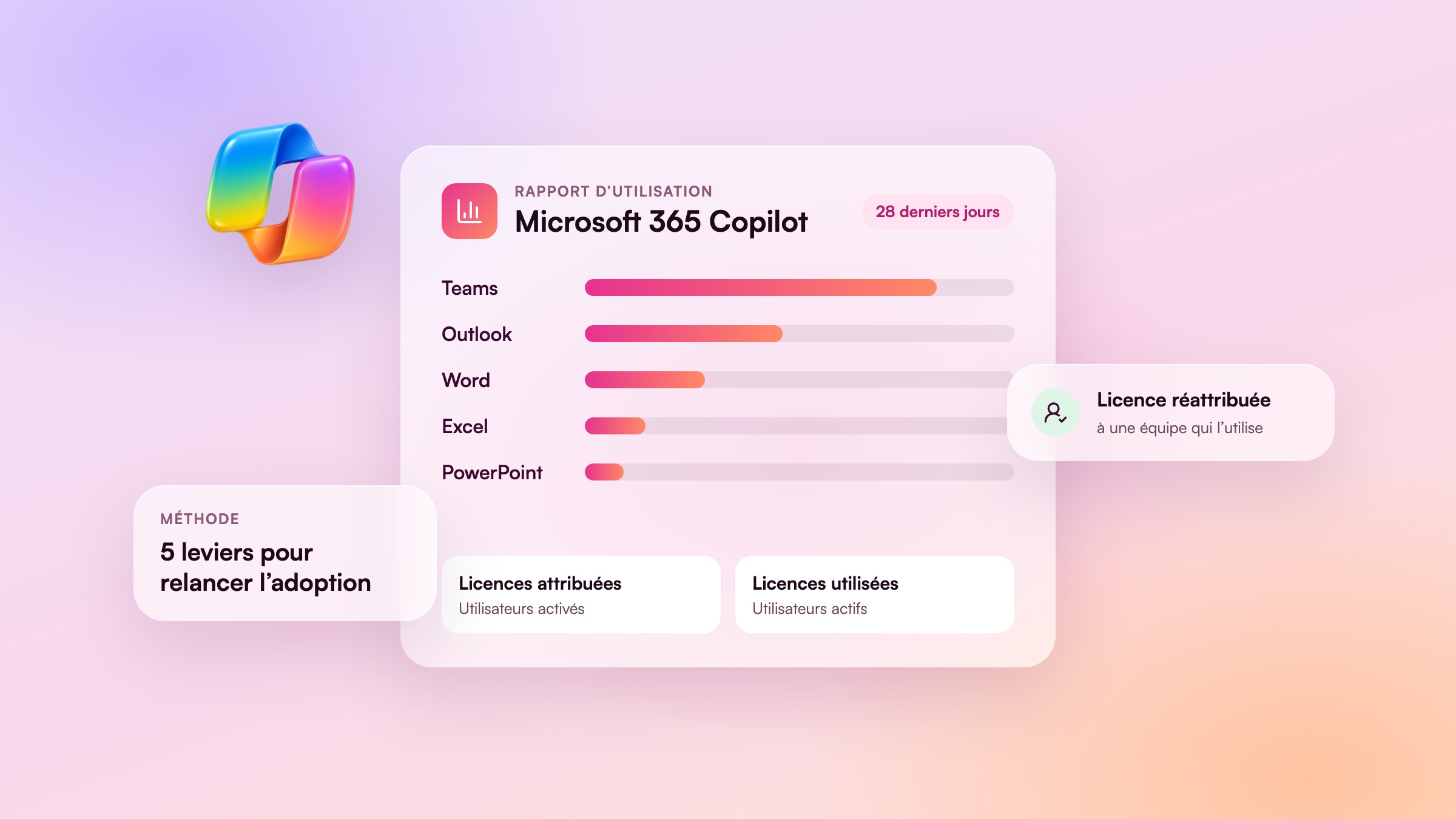
- An under-used Copilot licence shows up in the usage report in the Microsoft 365 admin centre: enabled users, active users, adoption by app.
- The first lever is measurement. Without it, you don't know which teams to follow up with or which licences to reassign.
- Copilot takes off when each role leaves with two specific tasks to hand over to it, taken from their daily work.
- Training works when it is done on the teams' real files: an Excel budget, a Word contract, an Outlook inbox.
- One champion per team keeps usage going after the training, far better than a reminder email.
- Copilot agents turn a good request into a reusable tool. At Ipsen, nearly 200 employees built their own in a single afternoon.
Read also: why so few Microsoft 365 users pay for Copilot and our guide to training your teams on Microsoft Copilot.
Why Copilot licences sit unused
The story is almost always the same. IT assigns the licences, sends an announcement email and offers a general demo. Employees try Copilot on a vague question, get an average answer and go back to their old habits. Only the Teams meeting summary survives, because it takes no effort.
Three causes come up again and again in the companies we meet. Nobody told the teams what to ask Copilot in their own job. The demo used made-up examples, far from their files. And once the session was over, nobody followed up, shared the good requests or answered questions.
To put it simply. A Copilot licence is like a gym membership paid for by the company. The card alone gets nobody through the door. People turn up when they are offered a programme at their level and a colleague is waiting for them on Tuesday evening.
Lever 1: measure real usage before you decide
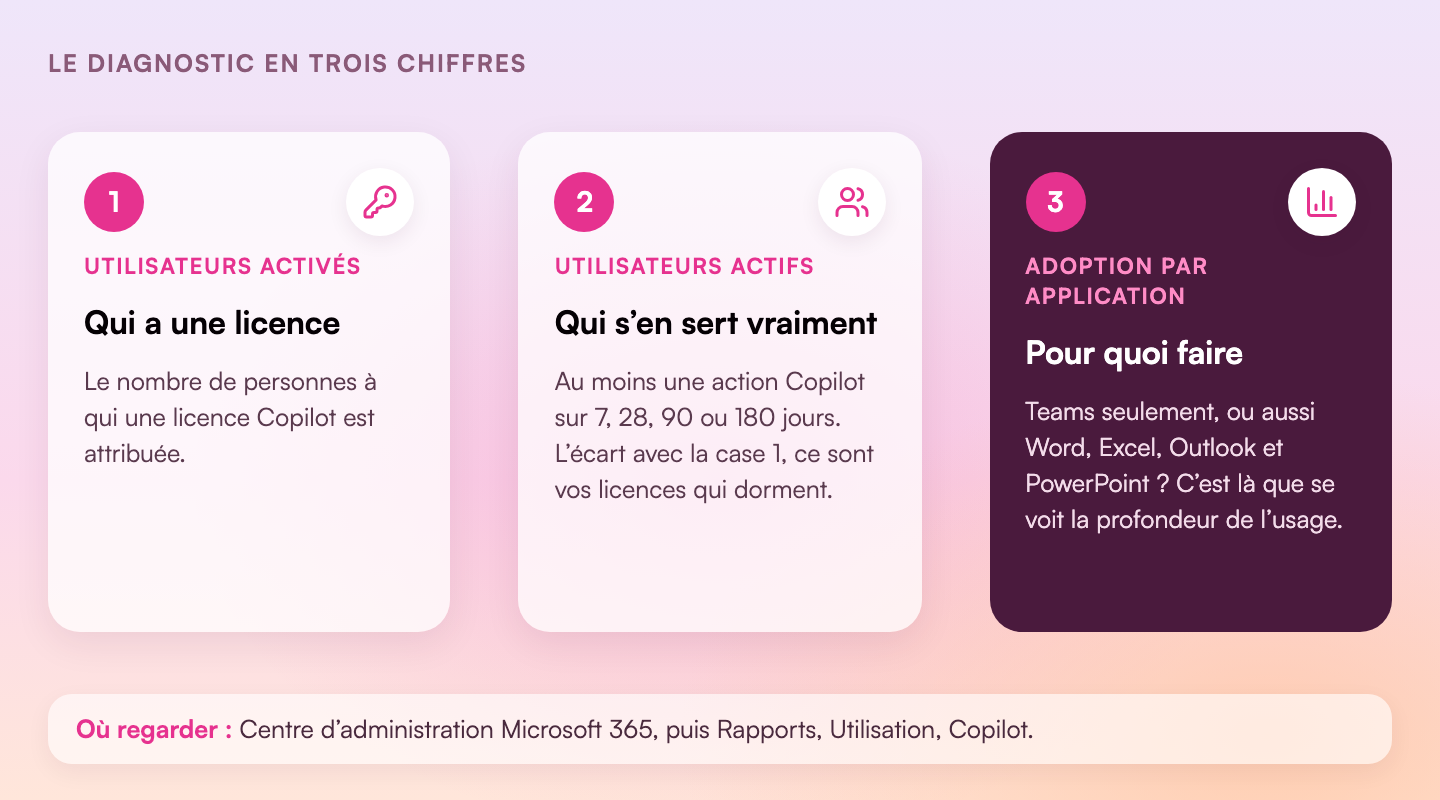
Before training anyone, look at the numbers. Microsoft provides a Copilot usage report in the Microsoft 365 admin centre: Reports, Usage, then Microsoft Copilot. Your administrator can get to it in a few clicks.
| Metric | What it measures | What you do with it |
|---|---|---|
| Enabled users | People with a Copilot licence over the period | Your starting point: the number of licences you pay for |
| Active users and active user rate | Those who used at least one Copilot feature, over 7, 28, 90 or 180 days | The gap with enabled users gives the number of unused licences |
| Adoption by app | Active users in Teams, Outlook, Word, Excel, PowerPoint | If everything goes through Teams, usage stays on the surface |
| Last activity date per user | The last day each licence was used | Spot licences inactive for more than a month, to reassign |
| Copilot dashboard (Viva Insights) | Readiness, adoption and impact, team by team | Choose which teams to support first |
Read these numbers by team rather than by person: their job is to show where usage takes off and where it stalls. The data arrives with a delay of about 48 hours, which is plenty for monthly tracking.
This diagnosis also gives you a quick decision: licences with no activity for several weeks can go to people who are asking for them. In many companies a waiting list already exists, even though nobody has written it down.
To put it simply. The active user rate works like the occupancy rate of a train. Knowing which carriages are empty tells you where to send a conductor, and which carriages to take off the train.
Lever 2: one use case per role, from daily work
“Use Copilot to save time” triggers nothing. “In Excel, ask Copilot to compare budget against actuals and pick out the five biggest variances” gets someone trying it the same day. The second lever is to give each role two specific tasks, the ones they do every week.
| Role | Where in Microsoft 365 | The first request to try |
|---|---|---|
| Leadership | Word, Outlook | “Summarise the last three committee minutes and list the decisions still pending.” |
| Finance | Excel | “Compare budget and actuals by line, pick out the five biggest variances and suggest a comment for each.” |
| Legal | Word | “List the differences between these two versions of the contract and flag the clauses that changed.” |
| Human resources | Word, Outlook | “Using this job description, write the job advert and five interview questions.” |
| Sales | Outlook, Teams | “Summarise my exchanges with this client over the last three months before our meeting tomorrow.” |
| Project management | Teams, Excel | “List the missed deadlines and the blocking issues in this project tracker.” |
That is the approach we took with VIAVEÏS, the telecoms subsidiary of VINCI Autoroutes. On 20 October 2026, we showed Copilot live to its executive committee, in its own Microsoft 365 environment, on its own topics: comparing contract amendments, structuring a monitoring watch, analysing a budget tracker, preparing a committee summary in Excel. Each demo started from a real responsibility held by an executive in the room.
To find those two tasks per role, the most effective route is a short workshop with each team. Our role-based AI workshops start from the list of what the team does every week, then test Copilot on it.
Are your Copilot licences sitting unused?
We train your teams on Word, Excel, Outlook, Teams and Copilot Studio, using their own files.
Copilot training for businessesBook a callLever 3: train on your teams’ real files
A demo on a made-up document convinces the room for an hour. The next day, faced with their own file, the employee no longer knows what to type. The training that restarts adoption uses what teams open every day: the quarterly budget, the contract under negotiation, the Monday morning inbox.

At VINCI Facilities, the session on Copilot and Copilot Studio was built on cases tailored to the group’s activities: meeting minutes written from handwritten notes, complex emails, legal monitoring and document translation. The innovation department summed it up like this: “We understood that AI could fit naturally into our tools, without making our methods more complicated.”
Three habits to pass on during training: name the file in the request, say who the result is for, and say what form you want it in (table, email, three sentences). Add checking: Copilot cites its sources in Microsoft 365, and every figure meant for a committee gets checked against the original file.
Lever 4: champions in every team
Training creates a spike in usage. What makes it last is a colleague you can ask “how do you do that?”. Appoint one Copilot champion per team: someone curious who already uses the tool, and who gets a little time for it each month.
Their role is simple. They collect the requests that work and share them in a Teams channel. They answer first-line questions. They report blockers: a file badly stored in SharePoint, a missing feature, a need that would justify an agent.
To bring everyone on board before moving on to teams, a group format helps. VIAVEÏS started with its executive committee, then moved on to an AI Show for all staff and role-based workshops. At Ipsen, the finance Agentathon worked the same way: everyone built on Agent Builder, while the “champions” went further with Copilot Studio. Those champions are your future go-to people in each team.
To put it simply. The champion plays the part of the neighbour who knows how to set up the broadband router. You don’t call support for a two-minute question, you knock on their door. Without them, the question goes unanswered and the tool stays in the drawer.
Lever 5: move on to Copilot agents
A good request to Copilot sometimes takes ten or twenty minutes to write. Then the conversation closes, and it all has to be redone the following month. A Copilot agent keeps those instructions, the reference documents and the output format. You write it once, test it and share it with the team.
The best candidates are recurring tasks with stable inputs and a deliverable in a known format: the monthly management commentary, the summary note for the committee, the standard reply to a supplier request. Agent Builder, built into Copilot, is enough for the first agents. Copilot Studio takes over when you need to connect other sources or automate more.
Business teams can do this. On 17 September, nearly 200 employees from Ipsen’s finance, purchasing and IT teams built their agents on Copilot in a single afternoon, in six 20-minute rounds: create the agent, give it the business documents, check that it cites its sources, improve it, connect it to Outlook, Teams or SharePoint, then put a figure on the time saved. At Meilleurtaux, 93 employees who had never written code produced 14 agents in three hours on Copilot Agent Builder.
When an agent needs to go further, plug into a CRM or an ERP, or run without anyone stepping in, the AI Sisters Lab designs it with you. See our AI agents page and our custom AI agent development offer.
The 90-day plan
The five levers follow one another over a quarter. Here is the order we follow with our clients.
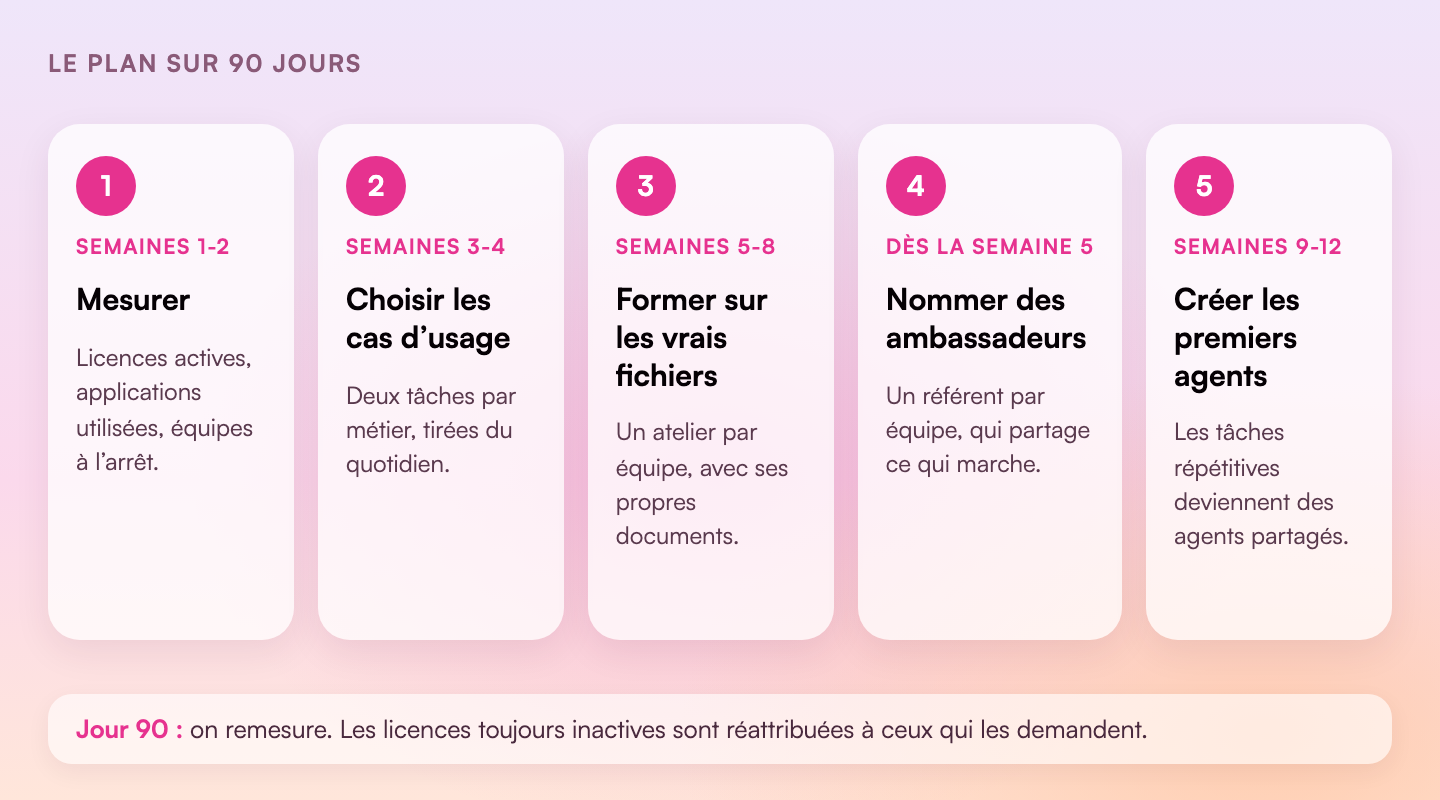
- Weeks 1 and 2, measure. Note enabled and active users, adoption by app and inactive licences. Sort teams into three groups: those who use it, those who have tried it, those who have never opened Copilot.
- Weeks 3 and 4, choose the use cases. With each team, list what it does every week and pick two tasks to hand over to Copilot. Start with tasks that involve no sensitive data.
- Weeks 5 to 8, train. One workshop per team, on its own files, with a sheet of ready-to-copy requests. Our training can be funded by your OPCO.
- From week 5, appoint the champions. One per team, a Teams channel to share the requests that work, a thirty-minute check-in each month.
- Weeks 9 to 12, build the first agents. Start from the recurring tasks spotted in the workshops. An afternoon Agentathon lets you produce several at once.
On day 90, repeat the lever 1 measurement and compare. Licences that are still inactive change hands, and the teams that have taken off become the example to show the others. To put a figure on the gain, use our method for calculating the ROI of AI training.
Let’s review your Copilot licences
A 30-minute call to read your usage figures and decide which teams to start with.
Book a callCopilot training for businessesKey takeaways
- An under-used Copilot licence can be measured: enabled users, active users, adoption by app, last activity date.
- Read these numbers by team, to know where to act.
- Give each role two specific tasks to hand over to Copilot, taken from its week.
- Train on real files: a precise request makes all the difference.
- One champion per team keeps usage going after the training.
- Recurring tasks become Copilot agents, which business teams know how to build.
- After 90 days, measure again and reassign the licences that are still unused.
Sources
- Microsoft Learn, Microsoft Copilot usage report, Microsoft 365 admin centre, accessed 6 November 2026.
- Microsoft Learn, Microsoft Copilot Dashboard for Microsoft 365 customers, accessed 6 November 2026.
- Microsoft Learn, Microsoft Copilot Studio overview, accessed 6 November 2026.
- AI Sisters, VIAVEÏS (VINCI Autoroutes) introduces its executive committee to Copilot, 28 October 2026.
- AI Sisters, Ipsen’s finance Agentathon, 24 September 2026.