"Make me a presentation on this topic." The request comes up every week in our training sessions, and the result almost always disappoints. The reflex is to blame the prompt. That is rarely the real issue: the problem lies in the route chosen to produce the file.
A PowerPoint file is not a text document. It is an XML archive in which every element is positioned to the millimetre, in absolute coordinates.
When you ask an AI for this file, it places blocks blindly. It does not see the rendering. It assumes a 60-character title will fit on two lines, it gets it wrong, and nobody finds out until the file is opened.
HTML and CSS, on the other hand, are the languages models master best, and the rendering is visible immediately in a browser. That is the whole difference between an AI working blind and an AI that can see what it is doing.
You have the presentation built in HTML, check it visually, then export it to PowerPoint.
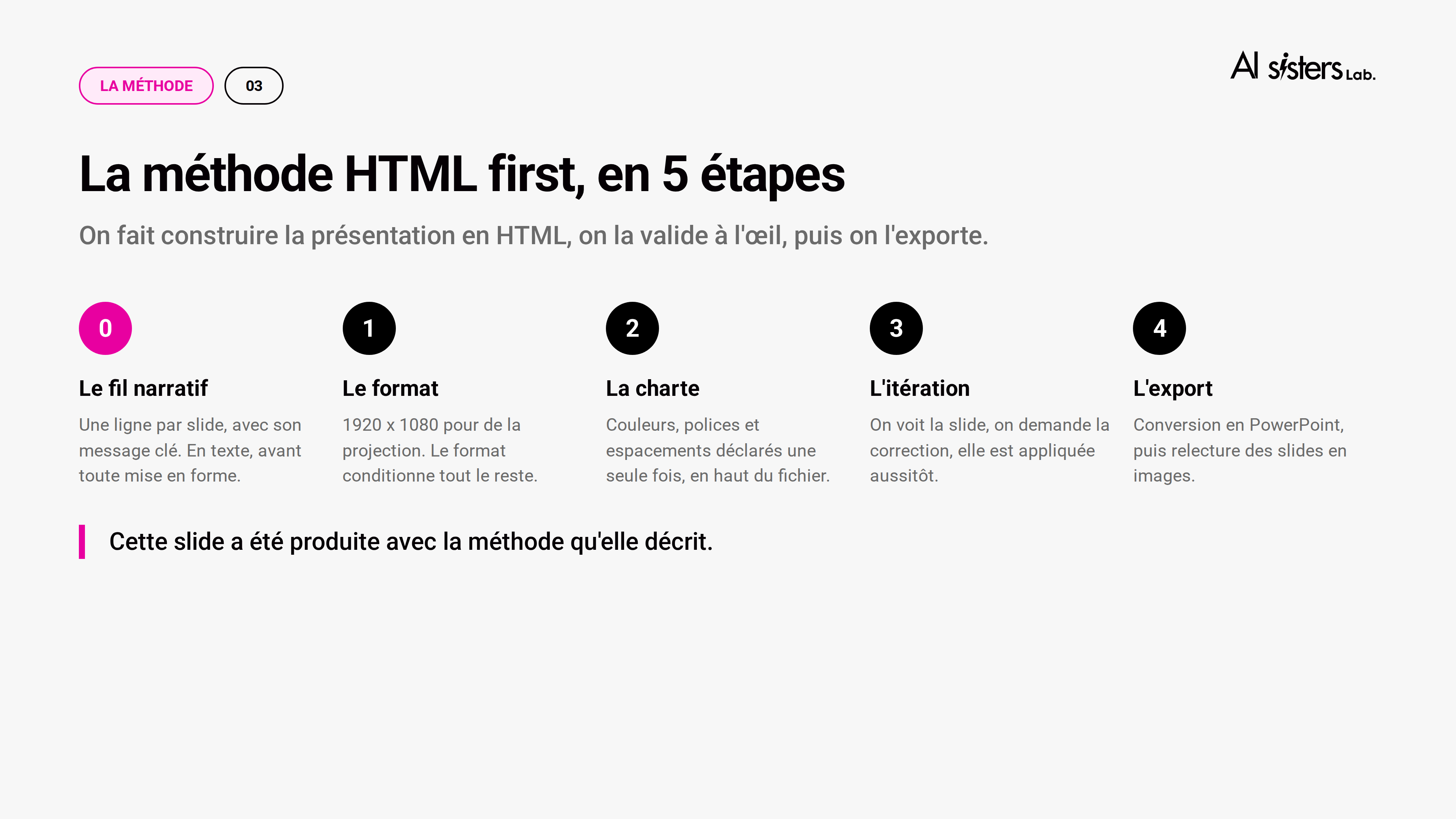
Step 0. The storyline. Have the outline produced in plain text: one line per slide, with its key message. You fix the logic in two minutes, before anything is formatted. It is the most valuable step in the process, and the one everyone skips.
Step 1. The format. 1280 x 720 for screens, 1920 x 1080 for projection, A4 portrait if the deliverable ends up as a document to read. The format determines the whole layout, so choose it at the start.
Step 2. The brand guidelines. Colours, fonts and spacing declared as variables, once, at the top of the file. Change one value and the whole presentation follows.
Step 3. Iteration. You see the slide, you ask "the right-hand column is too dense, put the last three points in a box", and it is fixed instantly.
Step 4. Export and review. Convert the file into images and look at each slide: text cut off at an edge, overlapping elements, unbalanced blocks. Two minutes of checking versus an incident mid-presentation.
There are two families of conversion tools, and almost nobody anticipates the difference.
Screenshot conversion captures each slide with a browser and inserts it as a full-page image. The rendering is perfect, but nothing can be edited any more.
Native conversion recreates real PowerPoint text boxes and shapes. The file stays editable, at the cost of a few differences on complex visual effects.
The rule: if someone else needs to edit the file after you, you need native conversion. This choice is made at the start, not at delivery.
What AI will not do for you
A title that carries the message. "Sales results" tells you nothing. "Two clients drive 80% of growth" tells a story. Models write descriptive titles by default, so you have to ask for something else.
Density. One idea per slide. Models fill the available space, so you have to forbid it in the prompt.
Verification. Any figure you did not supply yourself must be checked before sharing.
The prompt to copy and paste
Prompt
The prompt to copy and paste
The step 0 prompt, which produces the storyline before any formatting. It is the one that makes the biggest difference to the final quality. Replace the pink fields with your own details.
Step 1 · The storyline
Role
You are an art director and communications consultant with more than 15 years of experience, recognised as one of the best specialists in building presentations for leadership teams.
Context
I am [exact job title] at [company, sector]. I need to present [topic] to [specific audience] on [date]. I am sending you [source document, notes, data]. Our brand guidelines require [colours, font, template] and the presentation lasts [duration].
Task
First, suggest the storyline of the presentation, in text: one line per slide, each with its message title and the single idea it carries. Do not produce any formatting at this stage.
Goal
Validate the logic of the presentation before formatting it, so that the audience leaves with [the intended message or decision].
Constraints and format
Maximum [number] slides. Only one idea per slide. Titles must carry the message, not describe the content: write "Three markets account for 80% of growth" rather than "Market analysis". Do not invent any figures: if a piece of data is missing, write "to be completed".
Tone
Professional, direct, decision-oriented.
Step 2 · Once the storyline is approved
Now build this presentation in HTML, one section per slide, 1920 x 1080 format, with the colours and fonts from my brand guidelines declared at the top of the file.
Tip: only move on to step 2 once the storyline has been reviewed and corrected.
The 4 methods compared
The HTML method is not universal. Three other routes exist, and each one meets a different constraint.
There is no best tool in absolute terms, but a better route depending on your constraint. Select yours.
My constraint
AI Sisters comparison, September 2026. Offers change quickly: check each vendor's current terms.
FAQ - AI Sisters
FAQ
Creating presentations with AI
Answers to the questions teams ask when they start generating their materials with artificial intelligence.
Can you create a PowerPoint directly with AI?
Yes, but the result is much better if you go through an intermediate step. A .pptx file positions each element in absolute coordinates: when you ask for it directly, the AI places blocks without ever seeing the rendering, hence overflowing text and overlaps. The most reliable method is to have the presentation produced in HTML, check it visually, then export it to PowerPoint.
What is the best AI tool for making presentations in 2026?
There is no best tool in absolute terms, but a better route depending on your constraint. For a tailored result, the HTML-first method. To respect corporate brand guidelines, an AI add-in directly in PowerPoint. To go fast, a dedicated generator such as Gamma. For presentations that come back every month, automated generation.
How do I keep my brand guidelines when generating slides with AI?
Two options. Either you work in PowerPoint with an add-in that reads your slide master and respects your template, fonts and colours. Or you declare your brand guidelines as variables at the top of the HTML file: the whole presentation inherits them, and you change one value to update the whole deck.
Can the generated PowerPoint be edited afterwards?
It depends on the conversion mode, and this is the trap nobody anticipates. Screenshot conversion inserts each slide as an image: the rendering is perfect, but nothing can be selected any more. Native conversion recreates real PowerPoint text boxes and shapes. If someone else needs to take over the file, you need native conversion, and this choice is made at the start.
How long does it take to create a presentation with AI?
Allow around thirty minutes for a deck of about ten slides, including review, once you have mastered the method. The first attempt takes longer because you need to set up your brand guidelines, but they can then be reused for all subsequent presentations.
Why can my AI-generated slides be spotted at first glance?
Three signs come up every time: descriptive titles rather than titles that carry a message, slides that are too dense because the model fills the available space, and templates shared by thousands of users. AI saves you production time, not review time: that saved time is what you need to reinvest in the content.
Can you train your teams in these methods, and can it be funded?
Yes. These methods can be learnt in half a day, on your real materials: teams leave with their own template, their prompts and their export method. As AI Sisters is Qualiopi certified, this training is eligible for OPCO funding (French training funds), the skills development plan and FNE-Formation.
Where does your company stand with AI?Take the free AI diagnostic in 5 minutes and get your action priorities.
FAQ
Answers to your questions about AI in business. How to train your teams, identify the right use cases and roll out AI effectively.
How can I train my teams in AI without it taking months?
It is the question we hear most often. The short answer: with the right method, a single day is enough for your teams to really start changing their habits. At AI Sisters, we have built a three-step approach, tested on more than 350 projects:
Step 1 - Understand, not just "discover" We start with an AI Show: a live, immersive session with real-time demos on real cases. No generic slides. Your teams leave with a clear view of what AI can (and cannot) do for them.
Step 2 - Practise on real topics Hands-on workshops are organised by role: HR, Finance, Marketing, Sales, Legal, Ops. We use your real documents, your real emails, your real tools. Prompts are tested live.
Step 3 - Embed new habits at D+30 One month later, we run an impact review: what has been adopted, what is still blocking, what needs adjusting. This follow-up is what makes the difference.
In short: training your teams in AI does not take months. With an approach built on immersion, role-based practice and impact follow-up,
Can AI training really be adapted to my sector (healthcare, finance, industry...)?
Yes, and that is exactly what separates useful training from training people forget.
Before each project, AI Sisters carries out a pre-audit: we analyse your typical documents (contracts, emails, reporting, product sheets), your tools (Office suite, Google, CRM, ERP) and your workflows. We identify where AI can create value in your specific context. Then we choose, from our 40 business experts, the one who knows your sector best. An HR team in an industrial group will not see the same examples as a B2C sales team. Prompts, exercises, use cases - everything is adapted.
In short: AI Sisters adapts each training programme to the reality of your sector, thanks to a pre-audit and 40 business experts. Healthcare, finance, industry, services: content is built on your real documents and your real constraints, not on generic examples.
Can AI training be funded by my OPCO?
Yes, in most cases. AI Sisters training is Qualiopi-certified, which makes it eligible for OPCO funding (French training funds). The level of funding depends on your skills operator, the scheme used and your available budget, but in many cases a significant part of the cost can be covered.
In practice, we support you through the whole application: detailed quote, compliant programme, supporting documents, follow-up until reimbursement.
In short: thanks to Qualiopi certification, AI Sisters training is OPCO-fundable. The amount varies with your operator and your situation, but it can mean substantial savings.
Is AI training better on-site or remote?
Both work. What matters is the intention behind the format. On-site is ideal for a strong kick-off: a seminar day, a moment of collective co-creation, a team starting out together.
Remote is perfect for multi-site or international teams - our online sessions use training assistants via chat to keep things interactive (Q&A, co-writing prompts, live exercises).
Either way, the method stays the same: AI upskilling + practice + follow-up. And every session is led by a business expert, not a generalist trainer.
In short: on-site or remote, the format adapts to your organisation. AI Sisters keeps the same level of quality and interactivity in both cases, with business experts dedicated to each session.
Which tasks can I really hand over to AI in my team today?
The best way to answer is by role.
HR: screen CVs, generate job descriptions, write emails to candidates, prepare interviews. Finance: explain an Excel table, write a commentary on results, prepare a forecast budget. Marketing / Comms: create an editorial calendar, adapt a message into several formats, A/B test hooks. Sales: write prospecting emails, personalise sequences, prepare responses to tenders. Legal: analyse an NDA, flag risky clauses, generate a first draft to review. Leadership: summarise committee meetings, prepare strategy notes, build impact scenarios.
In our AI workshops, we do not show fictional cases. We take your real documents and test AI on them, live.
Before AI: 2 hours to write meeting minutes. With AI: 20 minutes. Before AI: 3 hours to analyse an Excel file. With AI: 30 minutes.
In short: AI can speed up dozens of practical tasks in every department. AI Sisters helps you identify the ones with the most impact for your team, and test them straight away on your own documents.
My team is not technical. Can they still use AI?
Yes. In fact, that is the whole point.
Our approach is 100% role-based, with no technical jargon. We start from your teams' real problems (lost time, repetitive tasks, heavy reporting) and show how to turn them into simple prompts.
At the end of the workshop, each participant leaves with ready-to-use prompt templates adapted to their job.
The goal is not to train data scientists. It is for every employee to be able to say: "This is how AI helps me in a typical day."
In short:You do not need technical skills to use AI every day. AI Sisters turns the tools into accessible, role-based practices, and gives every participant prompts they can use the very next day.
How can I be sure AI does not make mistakes in a sensitive context (legal, medical, financial)?
It is a more than legitimate question, and we address it directly in our training. We do not just show what AI can do. We also stress what should not be delegated to it, how to review and validate its answers, and how to combine a clear business brief with a well-built prompt to get the best quality.
Our experts know the constraints of your sector: compliance, deadlines, accuracy, GDPR, approved tools. Nothing is left to improvisation.
In short: AI Sisters builds the limits and risks of AI into its training. Your teams learn to use AI reliably, knowing what they can hand over to it and how to check the results.
The AI Sisters blog on generative AI in business.
Read our news, analysis and content to understand what artificial intelligence means for businesses.
.svg)



.avif)
