.svg)
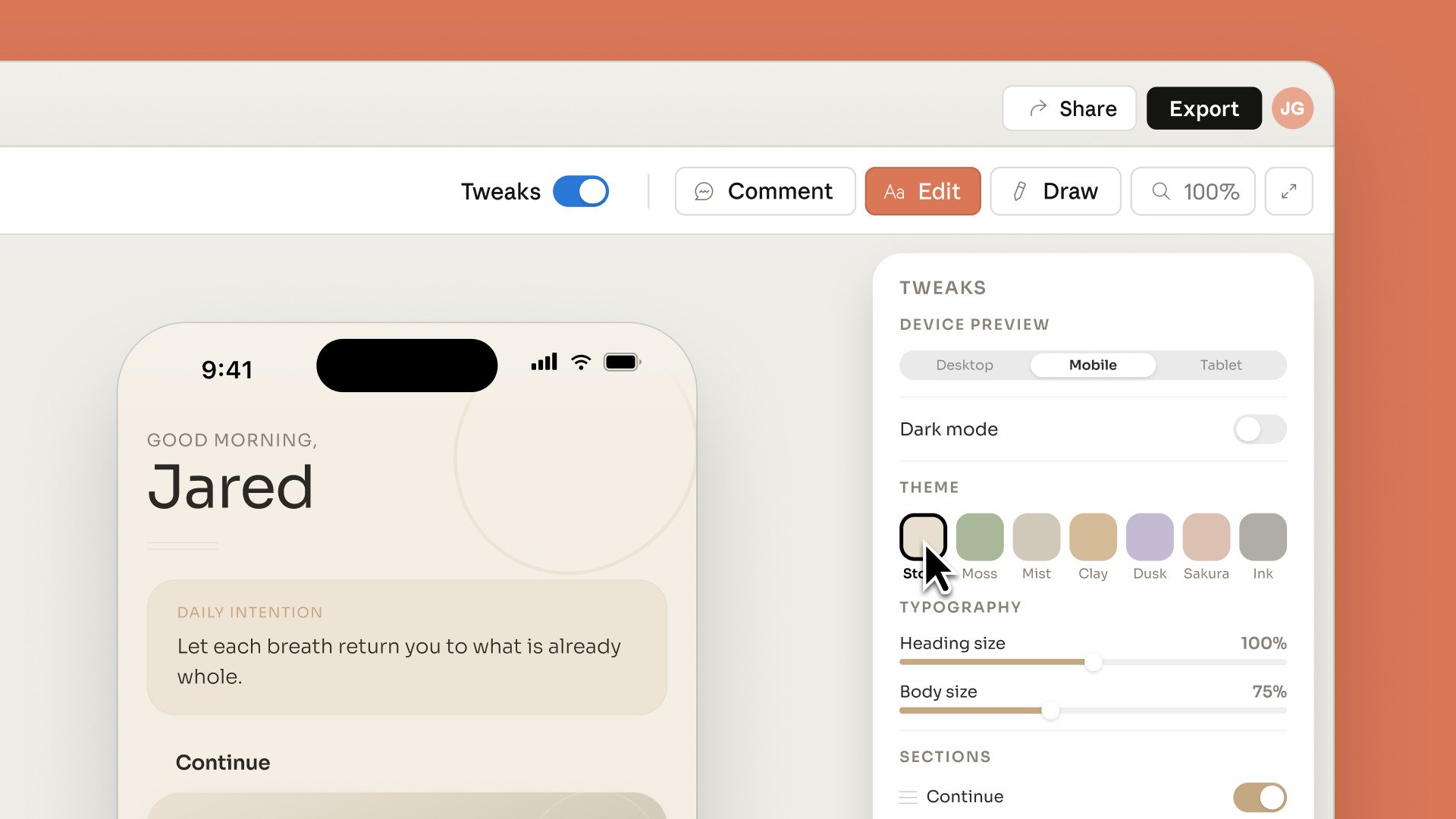
On 17 April 2026, Anthropic launched Claude Design, an AI-driven visual creation tool that generates mockups, interactive prototypes and presentations from simple text instructions.
Currently in research preview for Pro, Max, Team and Enterprise subscribers, the product runs on Claude Opus 4.7 and is part of Anthropic Labs' strategy to cover the entire creation cycle, from brief to production.
Behind the product announcement lies a real signal for companies: the boundary between design, marketing, product and dev is fading.
Teams that master these tools deliver faster, iterate more often and reduce friction between functions.
Those that don't get started will fall behind!
In this article, we explain what Claude Design concretely changes for your teams, the most actionable use cases, and how to roll out Claude across your teams to get a real ROI!
■ Train your teams in Claude Design and the Anthropic ecosystem
Hands-on workshops on your real use cases. Qualiopi certified. 900+ companies already trained.
→ Book a discovery call
What exactly is Claude Design?
Claude Design is a generative design tool developed by Anthropic Labs, available in research preview since 17 April 2026.
It lets any user, whether an experienced designer or a non-specialist, produce visual materials from natural-language descriptions!
In practice, you type an instruction
"Create a landing page for the launch of an HR SaaS product, professional tone, blue-and-white palette"
and Claude Design generates a usable first version, which you then refine through conversational iteration:
"make the hero section denser"
"change the CTA to pink"
"add a customer testimonials block".
The product doesn't stop there: it analyses your company's existing source code and graphic files to automatically extract a complete design system: colours, typography, components, spacing.
Everything can then be reused in later projects, which ensures immediate visual consistency!
To understand where Claude Design fits in the Anthropic ecosystem and the other recent releases, this in-depth guide helps you take a step back:
What Claude Design changes for corporate teams
An automatically extracted design system
This is probably the most strategic feature for CIOs and product teams.
You point Claude Design at your codebase or your current Figma files, and the tool rebuilds your visual identity in a usable form, without a designer having to re-document what already exists!
New projects then start from a consistent base, which eliminates the brand drift seen in most large organisations.
From prompt to prototype in minutes
Where a junior designer needed several hours to produce a usable mockup, Claude Design generates a first mockup in under two minutes from a text description! The user then refines it through iteration: editing an element, adjusting the layout, changing the colours, moving blocks.
All without ever opening specialist design software!
Multi-format import and web capture
The tool accepts PowerPoint presentations, Excel sheets, Word documents and images as input, and can even capture elements directly from a website to reproduce a visual environment.
A huge time saver for marketing teams who want to benchmark a competitor or start again from an existing template!
Collaboration and export
Claude Design includes sharing within an organisation as standard, with different access levels, and simultaneous editing by several people. Deliverables can be exported as PDF, PPTX, HTML or integrated into third-party tools.
Prototypes can be interactive, with video, voice and 3D elements, without writing a single line of code!
A direct bridge to Claude Code
The real game changer for product and dev teams.
Once the mockup is approved, it is transferred directly to Claude Code for the development phase.
No more endless back-and-forth between designers and devs: the AI bridges the gap.
To go further on the Claude ecosystem in the enterprise, this guide is a must-read:
■ Are your marketing, product or IT teams ready?
We audit your AI maturity in 30 minutes and propose a tailored training plan.
→ Request a free audit
Concrete use cases: who will really benefit
Beyond designers, Claude Design is aimed at several groups within companies.
Here are the uses we see emerging among our clients!
Marketing teams: producing materials at scale
Launch landing pages, campaign visuals, sales presentations, event materials: everything that used to require a designer brief + 3 days of iteration can now be produced in a few hours!
Marketing teams that master the tool multiply their production capacity by 4 to 5 without increasing headcount!
Product managers and digital project managers
Turning an idea into a clickable prototype before even briefing the tech team is every PM's long-standing dream.
Claude Design makes it accessible: you test, you iterate internally or with a few key users, then you move to the build only once the mockup is approved, which drastically reduces the failure rate of digital projects!
CIOs and internal IT teams
The most underrated use case: producing internal tools (HR dashboards, purchase request portals, business back-offices).
Instead of depending on an overloaded IT roadmap, business teams can prototype their ideal tool themselves, IT validates the technical feasibility, and Claude Code takes over for development.
At several large groups we support, this workflow cuts the time-to-market of internal tools by 3.
To see how an IT department can structure this kind of generative AI approach:
Sales and bid teams
Preparing a tailored tender response deck in under an hour, with the prospect's brand guidelines extracted from its website, becomes possible.
Salespeople who build Claude Design into their workflow save 5 to 8 hours a week on preparing personalised materials.
Founders and early-stage teams
For start-ups and scale-ups, Claude Design compresses the idea cycle → visual MVP → investor pitch into a few days.
It is a real competitive advantage for those who know how to use it, combined with Claude Code for production!

■ Move from theory to a real productivity gain
Claude Design workshops on your real cases — your teams leave with deliverables they can use the very next day.
→ Organise a workshop for my team
Where to start: train your teams so you don't miss the shift
Claude Design looks like a simple tool, and on the surface it is.
But getting a real ROI from it requires mastering visual prompt engineering, design system logic and the bridge with Claude Code.
Without this upskilling, teams produce pretty but unusable mockups and the productivity gain stays theoretical...
Step 1: Identify the target groups
Not all your employees have the same needs: prioritise the marketing, product and internal ops teams that produce the most visual materials day to day.
A quick diagnostic is enough to define the scope!
Step 2: Train on the Claude + Claude Design fundamentals
Before diving into Claude Design, your teams need to master the basics of Claude: effective prompting, context management, iteration logic.
Without this, the learning curve is much longer.
Our pillar page covers it all:
Step 3: Run a hands-on workshop on real cases
Theoretical training is never enough. At AI Sisters, we design workshops around the company's real use cases: a mockup of a real landing page, a prototype of an internal tool, a redesign of a sales presentation.
Employees leave with usable deliverables and real autonomy!
Step 4: Roll out a governance framework
Internal design system, usage rules, quality review, bridge with Claude Code: usage needs a framework to avoid fragmentation.
This is exactly what we did at ENGIE GET on AI agents, or at Mazarine for the dev teams, the framework is what makes the difference between a gadget and a production tool.
x5
Visual production capacity
< 2 min
To generate a first mockup
900+
Companies trained by AI Sisters
60,000+
Employees upskilled
Frequently asked questions about Claude Design
Question
Will Claude Design replace Figma in companies?
Not overnight. Figma keeps a lead in its plugin ecosystem, mature collaboration and the precision of its tools for experienced designers. However, Claude Design opens visual creation to groups who did not use Figma — marketing, product, ops, sales — and positions itself as a complementary AI layer. Within 12-24 months, many companies will use both in parallel, with Claude Design for fast prototyping and iteration, and Figma for final design deliverables.
Question
Who can access Claude Design today?
Claude Design is currently in research preview, available to Claude Pro, Max, Team and Enterprise subscribers, with a gradual rollout. Companies on a Team or Enterprise plan can already roll the tool out to their teams and start testing. For use at scale, the Enterprise plan is recommended for the appropriate governance and security controls.
Question
Do you need to be a designer to use Claude Design?
No, that is precisely Anthropic's positioning: making visual creation accessible to non-specialists. A project manager, a marketing manager or an operational manager can produce usable mockups after a few hours of training. However, to get a real productivity gain and avoid deliverables that look good but cannot be used, structured training remains essential — visual prompt engineering, design system logic, the bridge with Claude Code.
Question
Is Claude Design compatible with our privacy and security rules?
Claude Design runs on Anthropic's infrastructure, which offers Enterprise commitments not to use data for training, granular access controls and compliance suited to regulated environments. Before any wide rollout, we recommend having the product approved by your CIO and your DPO, and defining a clear usage framework — what types of data can be entered, who has access to what, how deliverables are stored.
Question
How can I train my teams effectively in Claude Design?
The right approach combines three building blocks: upskilling on the Claude fundamentals (prompting, context, iteration), a hands-on workshop on your real use cases (producing marketing materials, prototypes of internal tools, redesigning presentations), and a governance framework (design system, usage rules, bridge with Claude Code). AI Sisters, Qualiopi certified, designs these programmes to measure for marketing, product, IT and leadership teams, with usable deliverables by the end of the training.
■ Get ahead on Claude Design now
30 minutes with Emma Pariente and the AI Sisters team to scope your training plan and get your teams going before the competition.
→ Book my slot
Claude Design does not replace your designers; it gives them a lever to produce 5 times more, while opening visual creation to every function.
Companies that train their teams in the next 6 months will gain a head start that is hard to catch up with.
Share this if your marketing, product or IT team is concerned!
Where does your company stand with AI? Take the free AI diagnostic in 5 minutes and get your action priorities.





.avif)
