.svg)
On 25 September, Microsoft unveiled the biggest Copilot update since its launch. The app is now split into three tabs: Home, Code and Autopilot.
Satya Nadella calls it a “new operating system for work”.
Behind the slogan are three new ways of working and a new way of paying. It is the second that will weigh most on your budget. 😅
We read the announcement, the documentation and the first analyses. Here is what it changes for your teams 👇
“Autopilot is a persistent, proactive and personal agent that keeps working even when you don’t,” writes Jared Spataro, Microsoft’s chief marketing officer for AI at Work.
In brief
- Copilot becomes a three-tab app. Home to ask, Code to build, Autopilot to delegate.
- Home brings together chat, Cowork and Office. Word, Excel and PowerPoint open and can be edited directly in Copilot.
- Code lets a non-developer create an internal tool, a dashboard or a widget, by describing what they want.
- Autopilot is an agent that works without you. It is the new name for Scout, unveiled in June.
- Billing splits in two. Chat stays on a per-user licence, while agents move to pay-as-you-go, in Copilot credits.
- Nothing is open to everyone yet. Home and Code arrive through the Frontier programme, while Autopilot remains in private preview.
Further reading
Explore our other articles to go further with AI in the workplace:
Copilot becomes a three-tab app
Until now, Copilot was an assistant you asked questions. Microsoft now organises it into three spaces, each with its own role.
Home to ask, Code to build, Autopilot to let an agent work in your place.
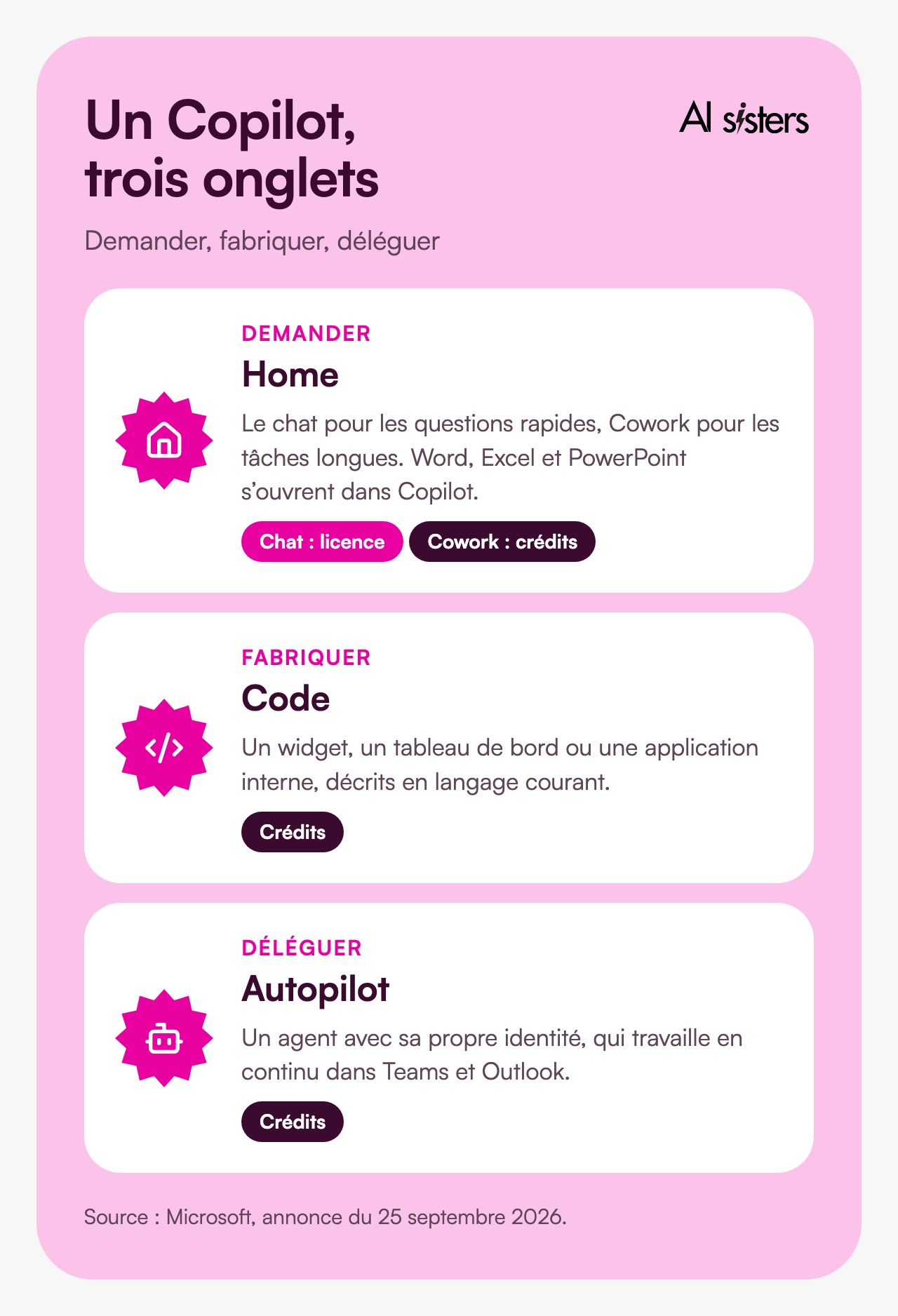
Each tab also has its own billing model, and that is where the budget is decided.
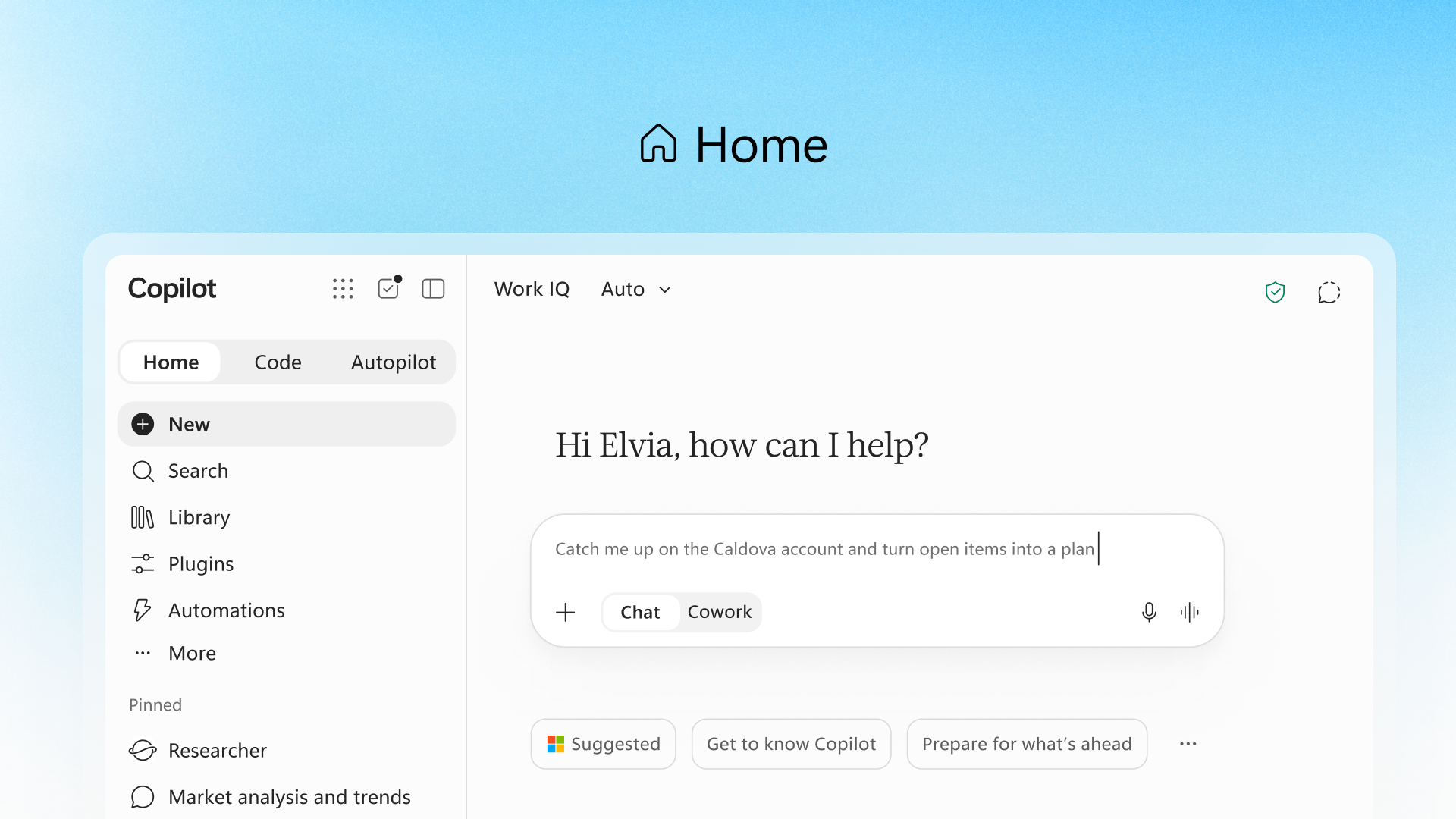
Home: chat, Cowork and Office in one place
Home is the new landing page. It shows your recent conversations, suggestions and work in progress.
A switch toggles between two modes. Chat is for quick questions and drafts. Cowork handles a long task from start to finish: Microsoft cites a tender response, a launch kit or a financial close pack. We described this delegation mode at Anthropic with Claude Cowork: Microsoft borrows both the name and the idea.
Another change: Office comes into Copilot. The output is a real Word, Excel or PowerPoint file, editable and shared live with the team. PowerPoint applies the company’s brand guidelines, and Excel shows the changes made by the AI and the reasons for them.
💡 In plain terms: until now, Copilot gave you text to paste into Word. Now it works directly in the file, like a colleague opening the same document as you.
Code: build your own tools without being a developer
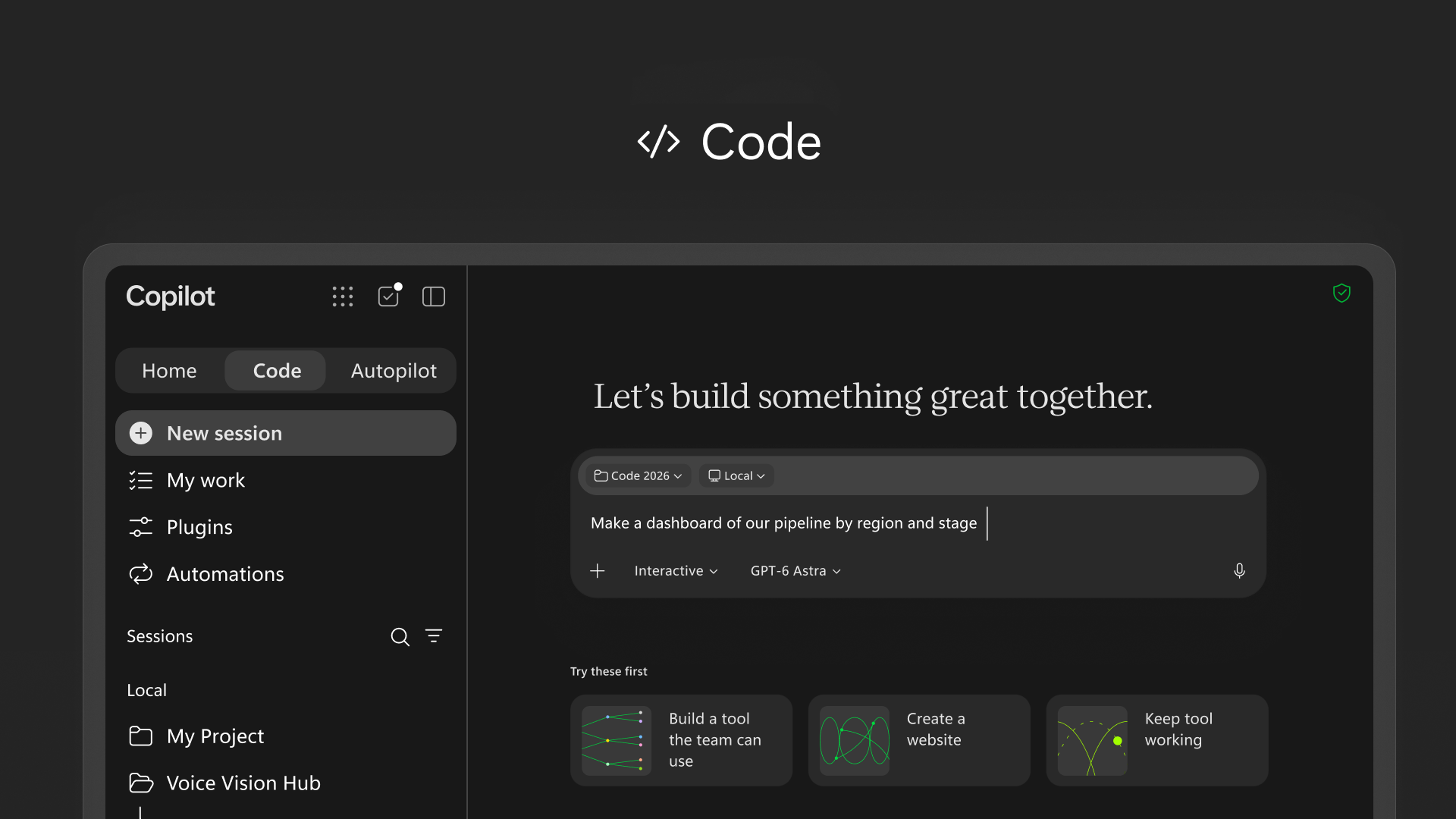
Code is aimed at people who need a small tool quickly. A financial controller who wants a pipeline dashboard by region, an operations manager who wants stock tracking.
You describe the tool in everyday language and Copilot writes it. Microsoft announces desktop widgets, interactive dashboards and cloud-hosted internal apps.
The engine is the same as GitHub Copilot’s. The tool runs in an isolated environment, Copilot Managed Runtime, inside your Microsoft 365 environment. What a non-developer builds therefore does not touch your production systems directly.
💡 In plain terms: Code is a bit like Excel macros, 2026 edition. Anyone can knock together a tool. And as with business-critical Excel files, you will need to know who maintains it when its author changes role.
Autopilot: the agent that carries on after you leave
Autopilot is the newest piece. Microsoft first presented it on 2 June under the name Scout.
It is a persistent agent. You give it a name, a role and a goal, and it works continuously in the cloud, even when you are offline. It monitors Teams channels, follows up on threads, runs recurring tasks and picks a project back up several days later.
Microsoft’s example: running an entire supplier review, from booking meetings to follow-ups afterwards.
On security, each agent has its own identity in the company directory (Microsoft Entra), and each of its actions is tied to a known owner. Sensitive actions can require human approval. Access to a mailbox or calendar requires an additional account and licence.
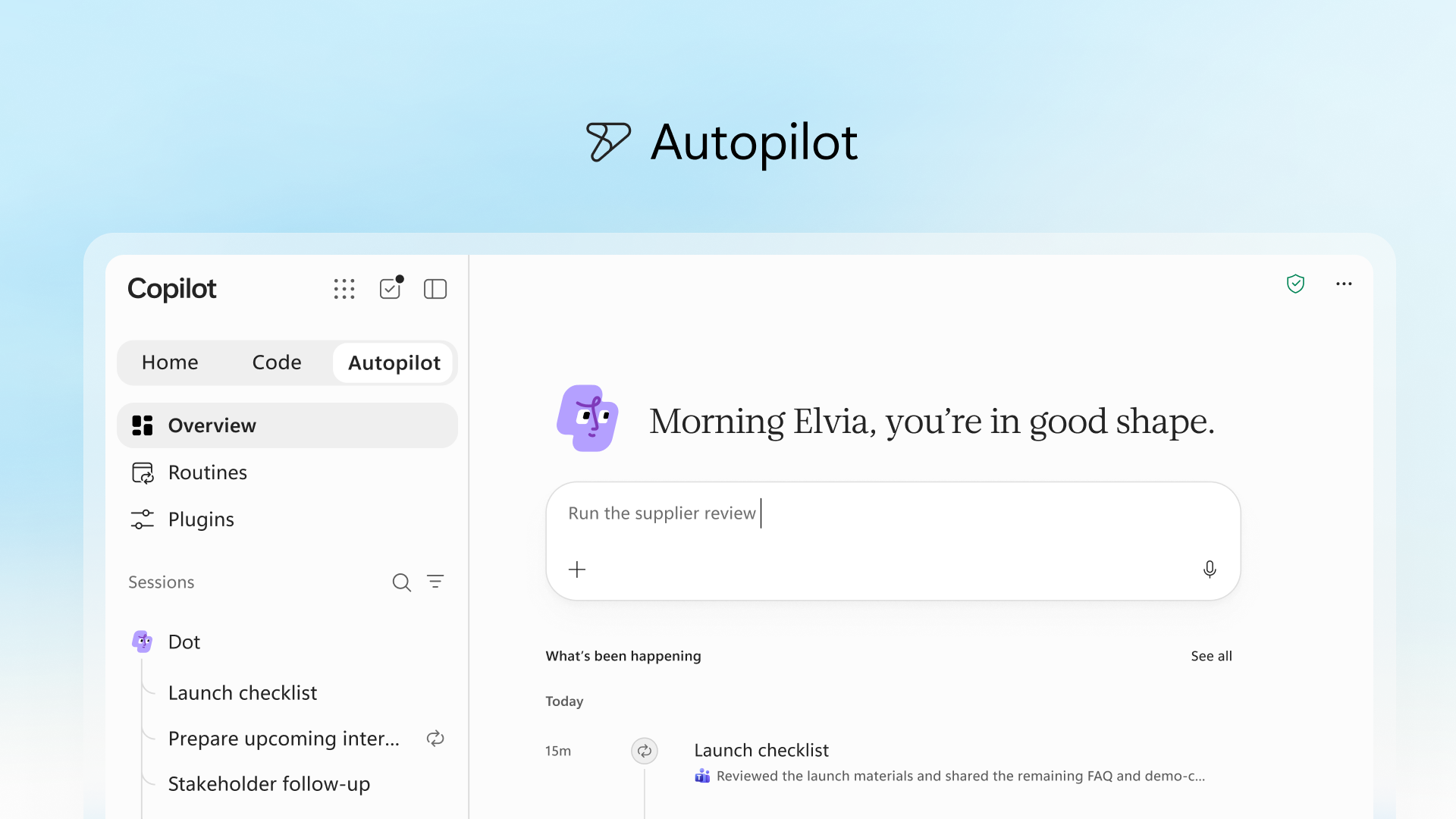
💡 In plain terms: Home is an assistant you talk to. Autopilot is more like an intern you hand a file to for the week. It has its own badge, its own desk, and it reports back to you.
Jacob Andreou, executive vice president at Microsoft, admits himself, according to DevX, that this autonomy can be “absolutely terrifying” for an IT administrator.
Discover our AI training & book a call
Explore our training modules and choose, with us, the one that best fits your AI needs.
📚 See our AI training 📞 Book a discovery call
Pay-as-you-go billing, the change that matters most
For a company, the biggest change is in the contract: Copilot is no longer paid for by seat alone.
The fixed-price per-user licence covers chat, Copilot in Word, Excel, PowerPoint, Outlook and Teams, and model choice. Copilot credits, paid as you go, cover Cowork, Code, Autopilot and the most powerful models, such as GPT-6 Astra and Fable.
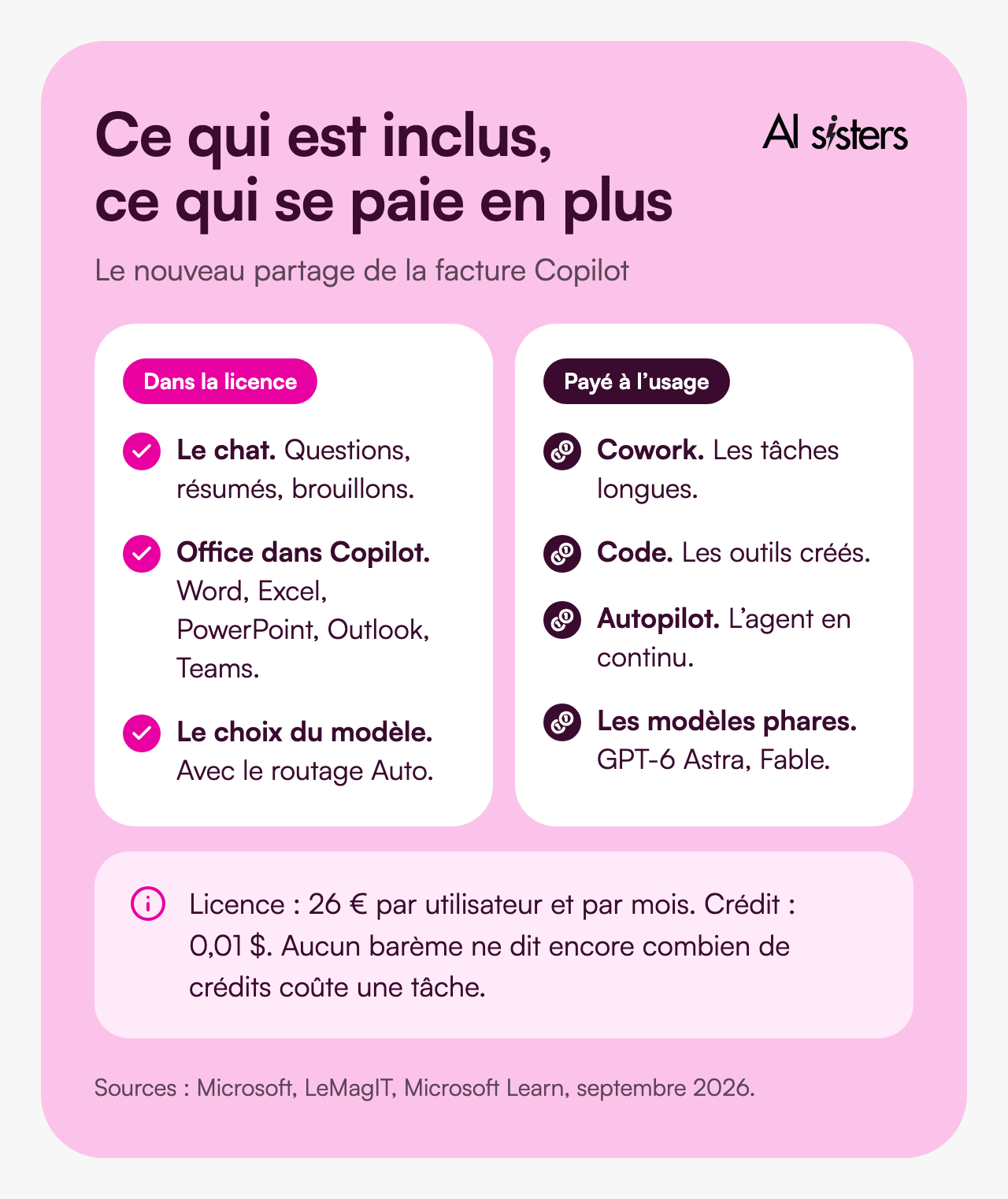
According to LeMagIT, the base licence costs €26 per user per month. Microsoft’s documentation lists a Copilot credit at $0.01 on pay-as-you-go. However, no public price list yet says how many credits a Cowork task or a day of Autopilot consumes.
The risk is easy to state. An agent that runs continuously consumes continuously, and no per-seat cap stops the spending.
Microsoft has built in safeguards: budgets per company, per group and per user, credit requests subject to approval, and the option to reserve the most expensive models for certain teams. Each user can see their usage and balance.
Gartner, quoted by LeMagIT, sums up the dilemma: licensing becomes simpler, but the investment grows, with usage costs that are hard to predict. It was already the question raised when some users refused to pay for Copilot.
💡 Put simply: the licence is your phone contract. Credits are the out-of-plan charges: someone needs to check the bill every month.
What it changes, role by role
Microsoft’s examples point to three uses. Each one maps to a tab.
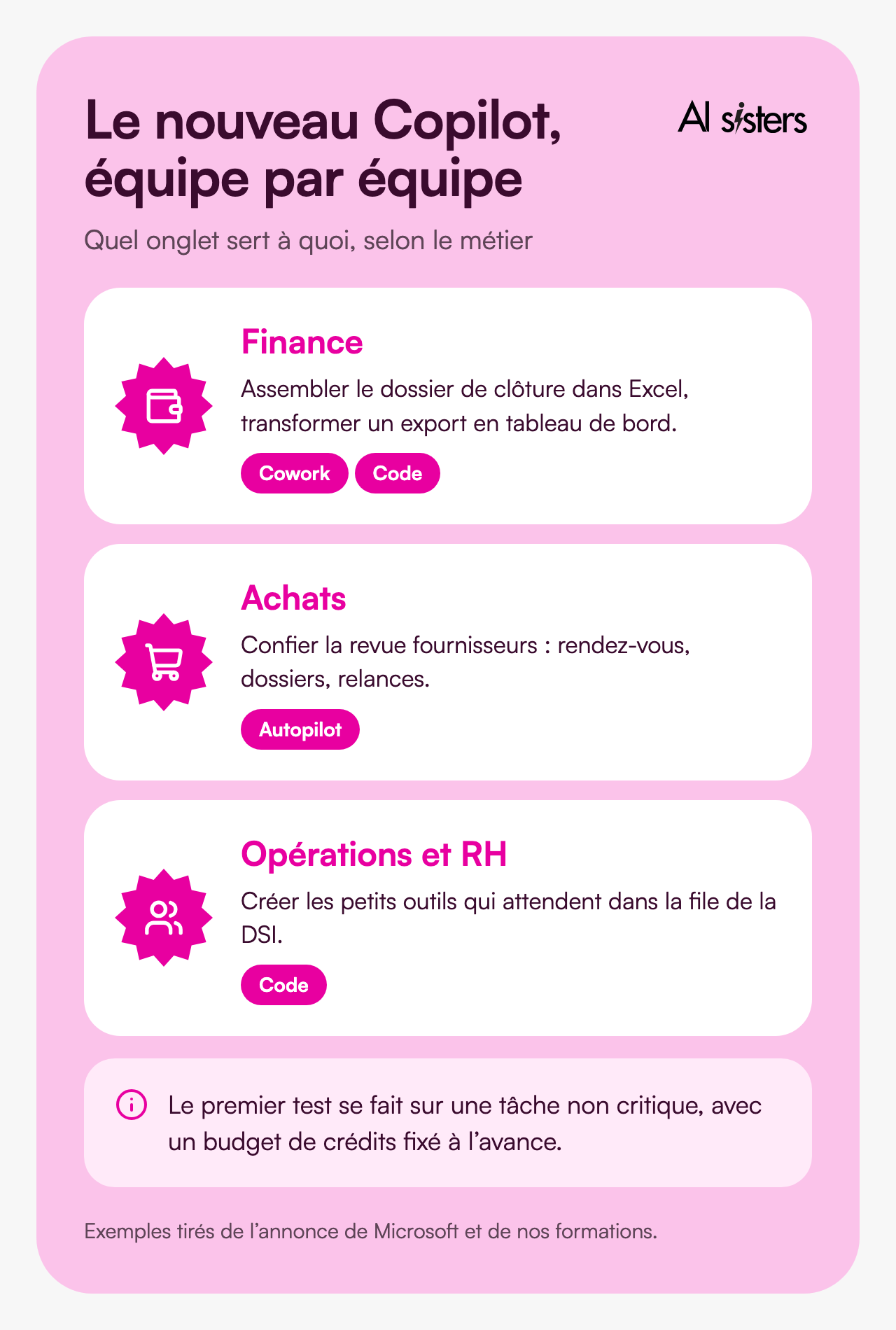
For a finance team: the close pack and the dashboard.
A financial controller spends several days a month consolidating files. Cowork can assemble the pack in a real Excel workbook, with change tracking, and Code can turn a recurring export into a dashboard. Start with internal reporting you already know well.
For a procurement team: the supplier review handed to Autopilot.
This is the example Microsoft chose. The agent keeps the calendar, prepares the files and follows up after each meeting. The buyer keeps the negotiation. Test it on five non-strategic suppliers, and define what the agent can send without approval.
For operations and HR: the small tools that were missing.
An onboarding tracker, an equipment request form: these tools often wait months in the IT department’s queue. With Code, the business owner describes them and can have them the same afternoon. Decide from the start who maintains them.
Every generation consumes credits. Measure over a month before rolling out.
It is what we see in training: teams make progress when they start from a specific task 💡 That is the whole idea behind our guide to training your teams on Microsoft Copilot.
Book your 30-minute call now
A no-obligation conversation to build your AI training around your tools.
👉 Tell us about your AI project 👈
How to prepare your company
Nothing is open to everyone today. You have a few weeks to prepare.
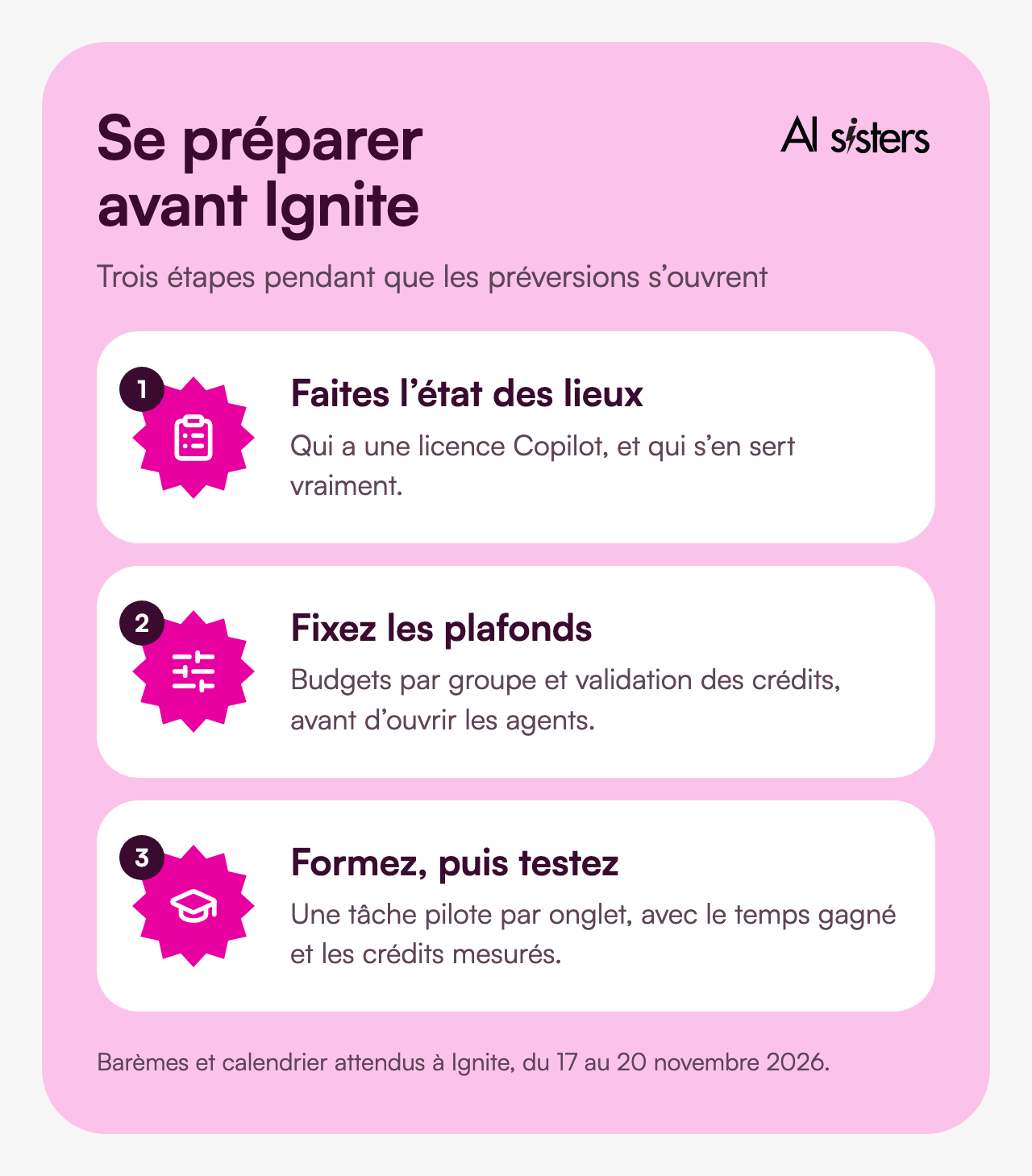
Audit your licences. Who has Copilot today, and who actually uses it? According to DevX, Microsoft has 30 million paid seats, around 7% of its commercial base.
Request access to the Frontier programme if you want to test Home and Code ahead of others.
Appoint an owner for the AI budget. With pay-as-you-go billing, Copilot spending becomes a variable cost, like the cloud.
Set the caps before opening up the agents. Budget per group, approval of credit requests, reserved models: everything is configured in the admin console.
Train, then test one task per tab. A user who frames their request poorly consumes more credits for a worse result.
Wait for Ignite, from 17 to 20 November 2026, and its final price lists before any annual commitment.
Book your 30-minute call now
A no-obligation conversation to build your AI training around your tools.
👉 Tell us about your AI project 👈
Key takeaways
- Copilot is organised into three tabs: Home to ask, Code to build, Autopilot to delegate.
- Office comes into Copilot. The documents produced are real files that several people can edit.
- Autopilot works on its own, with its own identity. Its actions are logged and can require your approval.
- The licence no longer covers everything. Cowork, Code and Autopilot are paid as you go, in credits.
- No one has yet published a real cost per task. Measure on a pilot before rolling out.
- Nothing is open to everyone today. You have a few weeks to prepare.
Sources
- Microsoft, Introducing the new Copilot with Home, Code and Autopilot, 25 September 2026.
- Microsoft Copilot (YouTube), The new Copilot: where AI-powered work comes together, September 2026.
- Microsoft Learn, Microsoft 365 Copilot pay-as-you-go, accessed 1 October 2026.
- LeMagIT, Microsoft unifie les capacités de Copilot et scinde son modèle tarifaire, September 2026.
- Blog du Modérateur, Microsoft dévoile le nouveau Copilot avec trois espaces, September 2026.
- DevX, What Is Microsoft Copilot Autopilot?, 28 September 2026.
- Future Work, FinOps Is the Story, 27 September 2026.
- Numerama, via Titres Presse, Le nouveau Microsoft Copilot s’attaque à Claude et ChatGPT, September 2026.




.avif)
