.svg)
In three weeks, Anthropic has taken Claude Cowork from promising desktop tool to fully operational digital colleague. Here is what changes for your teams, and how to make the most of it this week.
Want to roll out Claude across your teams, Cowork included? Discover our dedicated training.
What exactly is Claude Cowork?
Where the chat answers, Cowork executes. You give it a goal, not a method. Claude works directly in the folders and tools you have authorised, then hands you finished work to review.
In practice: “read these 30 tender PDFs and write me a summary note with the risks”, “prepare the monthly report from these exports”, “organise this client folder according to our naming convention”.
Launched as a research preview in January 2026, Cowork grew out of an internal observation at Anthropic: developers were using Claude Code for everything except code. Rather than restrict this use, the company turned it into a product in its own right, with no terminal or command line.
In short: the chat helps you think, Cowork does the work.
New feature #1: Cowork has its own browser
Since 26 August 2026, when a task needs a website, Claude opens a browser in a side panel of the desktop app: it browses, reads, clicks and types.
Until now, you had to go through the Claude in Chrome extension, and therefore through your own browser. Yet many tasks do not need your browser, just a browser.
What this unlocks: retrieving the month's invoices from a portal with no connector, extracting figures from an internal dashboard, running sourced monitoring across 20 sites, filling in a repetitive form.
What you need to know: the built-in browser is separate from yours (no shared tabs, bookmarks or passwords). You import your logins site by site, with banking sites, email and SSO excluded by default. Rolled out on Pro, Max and Team, enabled by default, and managed by administrators on Enterprise.
The point to watch: an agent that browses remains exposed to prompt injection, hidden instructions in a page that try to hijack it. Anthropic applies the same protections as for Claude in Chrome and states that they greatly reduce the risk without eliminating it. Start with trusted sites.
In short: Cowork can finally work on the web without borrowing your browser, provided you set the authorised sites.
New feature #2: a single memory across chat and Cowork

Announced on 25 August 2026, this is the most significant update for a business. Chat memory and Cowork memory are now one and the same.
Brainstorming an event agenda in the chat? When Cowork builds the budget, it already knows the number of attendees, the city and the speakers. Explain once how your team defines its KPIs? Every quarterly review produced afterwards uses them, with no re-briefing.
Two further changes complete the announcement.
Memory now builds up as the conversation goes, rather than through a summary afterwards. And everything Claude remembers is visible as files by topic, which you can read, correct or delete.
On GDPR: sensitive topics (health, origin, beliefs, political opinions) are not stored by default. Memory is on by default on Free, Pro and Max; on Team and Enterprise, administrators decide whether to allow it.
In short: shared memory removes the hidden cost of AI at work, the context you re-explain ten times a week. And it is auditable.
New feature #3: Cowork everywhere, including mobile
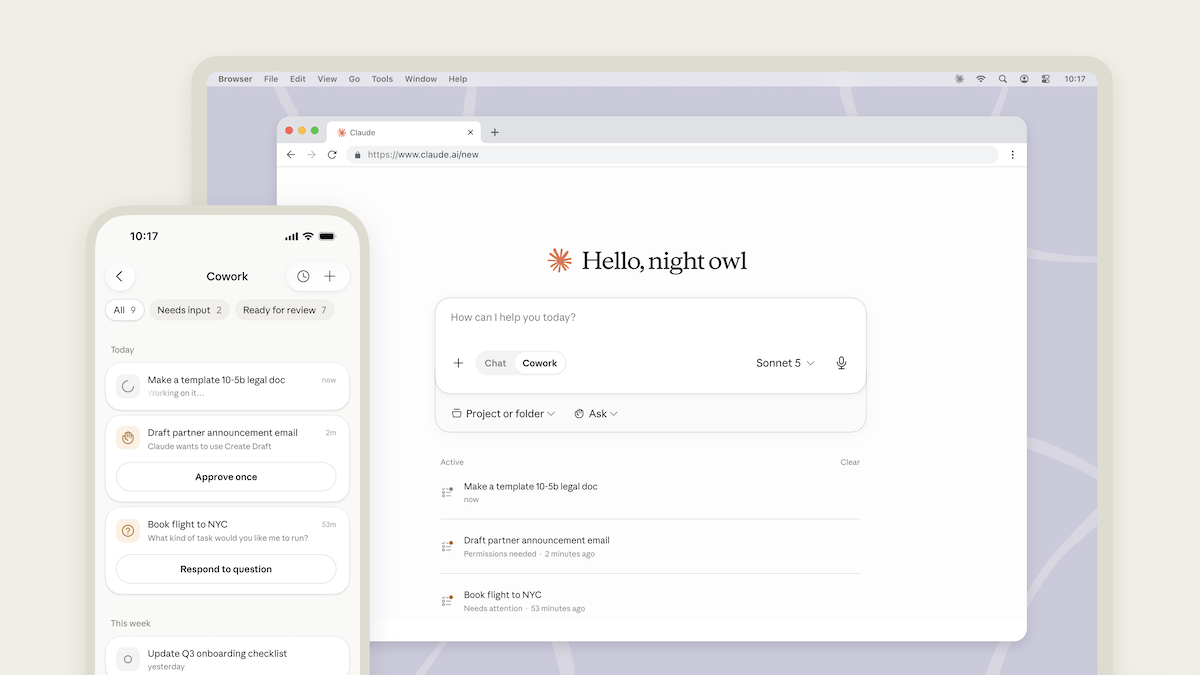
Since 18 August 2026, Cowork has been available on mobile and web for all paid plans, with chat and Cowork brought together in one space.
You start a task from your phone, it runs server-side, and you pick up the deliverable at your desk. Scheduled tasks (daily briefing, weekly report) run without any device switched on.
One nuance: the built-in browser lives in the desktop app. From mobile, Claude can control it as long as your desktop app is open and connected.
In short: Cowork becomes an asynchronous agent. You order the work; you no longer watch over it.
New feature #4: the enterprise side matures
This is the part that unlocks large-scale roll-outs.
Compliance: since 11 August 2026, the Compliance API covers Cowork and Claude Code, using the existing access key.
Administration: access management, spending control and usage tracking across the organisation.
Connectors: one-time provisioning via the identity provider, with employees inheriting approved connectors from their first login.
In short: the barrier to roll-out is no longer technical; it is cultural.
- Committee summary from the transcript
- Structured decision memo
- Quantified impact scenarios
- Retrieving documents from portals
- Consolidating exports
- Commentary on results using your template
- Sorting and summarising applications
- Interview preparation
- Updating a document library
- Sourced competitive monitoring
- Adapting one message into ten formats
- Content that follows your brand guidelines
- Account preparation before meetings
- Responses to tenders
- Personalised sequences from the CRM
- Analysis of a body of contracts
- Identifying high-risk clauses
- First draft of a document for review
Limits to know before putting your teams on it
- Delegation has to be learnt. Moving from a chat prompt to a task objective is a real change of mindset. Teams without support keep using Cowork like a chat.
- The scope must be defined. Authorising a folder is a security decision, not a configuration click.
- Prompt injection is a real risk. Keep a human review on sensitive actions.
- Review is still mandatory. Cowork produces finished work, not validated work.
- Plans determine features. Check before promising a use case to an entire department.
How to get started in three steps
1. Choose a process, not a tool. A recurring, documented task with stable input files and a clear deliverable: monthly reporting, committee preparation, case file summaries.
2. Define access. One authorised folder, connectors approved by IT, and a simple rule on what does not leave the company.
3. Train people to delegate, not to click. The skill to build is not “knowing where to click”; it is knowing how to frame a goal, provide the right context and review a deliverable produced by an agent.
Is Claude Cowork available in France?
What is the difference between Claude, Cowork and Claude Code?
Does Cowork need an extension to browse the web?
Is my data exposed if Cowork browses on my behalf?
Can I control what Claude remembers about my company?
Do you need training to roll out Cowork in a team?
Where does your company stand with AI? Take the free AI assessment in 5 minutes and receive your action priorities.






.avif)
